


Demat Debit and Pledge Instruction (DDPI) is a document that allows your broker to debit securities from your demat account and deliver them to the exchange. You do not have to enter the CDSL TPIN and OTP to sell shares once you submit the DDPI. To enable DDPI, a charge of ₹100 + 18 % GST is applicable. You must maintain sufficient money in your Zerodha account, as the charge will be deducted from your Zerodha account balance.
SEBI introduced DDPI, which limits debiting shares from your account only if the client places a sell trade. DDPI replaced POA on November 19, 2022.
How to activate DDPI online
On Kite app
- Log into console.zerodha.com.
- Click on Account.
- Click on the arrow and then click on Demat.
- Click on Enable Demat Debit and Pledge Instruction (DDPI).
- Accept the terms and conditions. Click on Continue.
- Click on Proceed and then on Sign Now.
- Accept the terms and conditions. Enter the Aadhaar number.
- Click on Send OTP.
- Enter the OTP.
- Click on Verify & Sign.

On Kite web
- Log into console.zerodha.com.
- Click on Account.
- Click Demat.
- Click on Enable Demat Debit and Pledge Instruction (DDPI).
- Accept the terms and conditions. Click on Continue.
- Click on Sign Now.
- Enter the Aadhaar number and click on Get OTP
- Click on Accept & Continue.
- Enter the OTP.
-
Click on
Verify OTP.
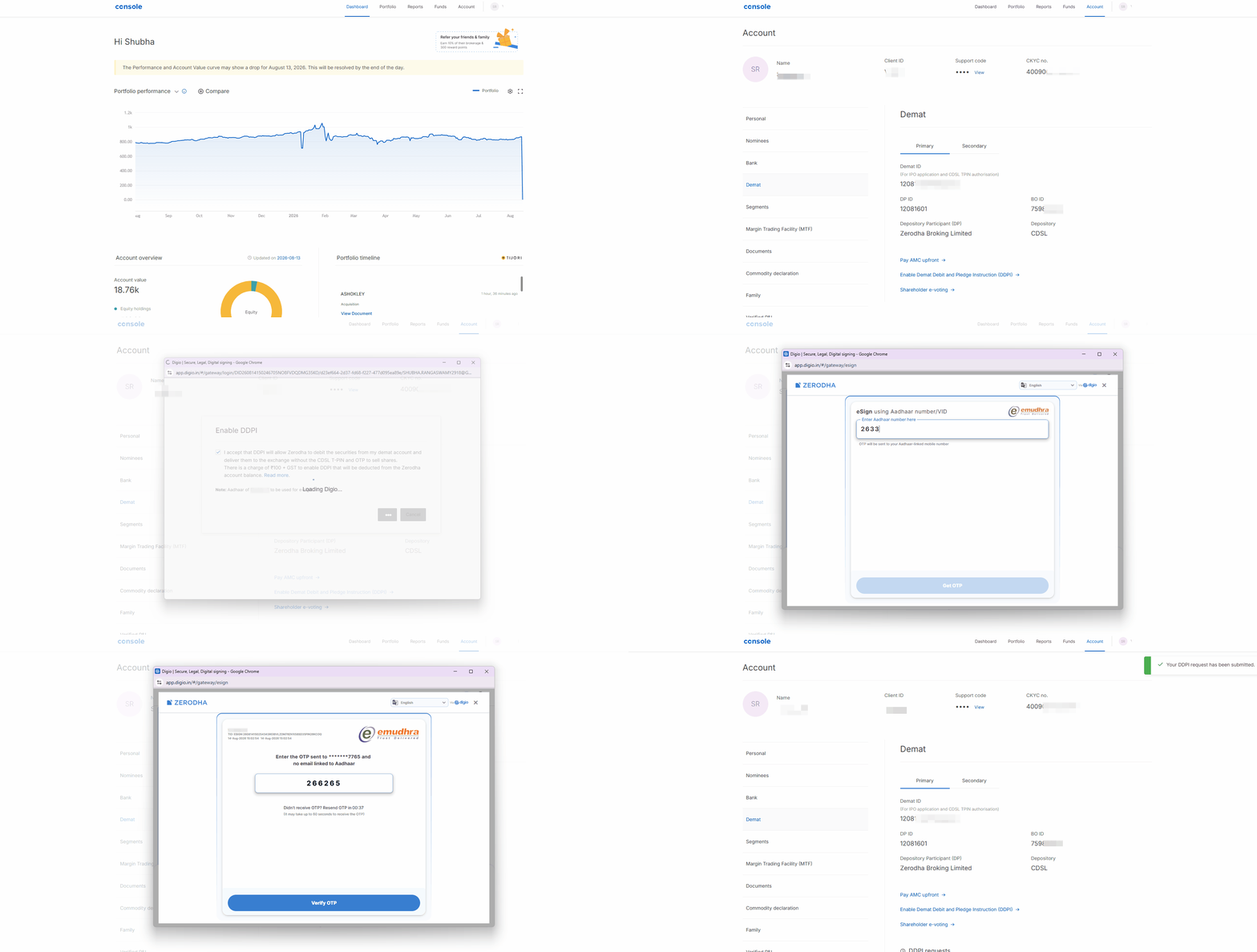
The DDPI will be activated within 24 working hours, and once it is processed, a confirmation email will be sent.
For minor accounts, the Aadhaar number of the guardian who opened the account must be entered to enable DDPI.
How to activate DDPI offline
NRI clients using Orbis for custodial services, joint account holders, and non-individual account holders can only activate the DDPI offline. To activate the DDPI, courier the DDPI (PDF). Refer to the sample copy of the DDPI (PDF) to learn where to sign and how to fill the DDPI. Client ID is the 16-digit Demat ID that can be found by visiting console.zerodha.com/account/demat.
Ensure that the signature on DDPI matches the previously uploaded signature while opening the Zerodha account. The uploaded signature can be found by visiting console.zerodha.com/account/documents , selecting Signature proof in the drop-down menu, and clicking on E-mail to me. Non-individual account holders must add the seal along with the signature.
For HUF accounts, the DDPI (PDF) requires the HUF seal and signatures of the Karta and the major co-parceners. Refer to the sample copy (PDF).
Courier it to the following address:
Zerodha Customer Support Centre
#192A, 4th Floor, Kalyani Vista
3rd Main Road, JP Nagar 4th Phase
Bengaluru 560076
For minor accounts, the guardian who opened the account must sign the forms to enable DDPI.
The DDPI will be activated within 72 working hours of receiving your form, and once it is processed, a confirmation email will be sent.
Things to keep in mind
- NRIs can activate DDPI online only if their Aadhaar is linked to their mobile number and they are physically present in India at the time of e-signing.
- Once the online process is completed, an email from National E-Governance Service Limited (NeSL) is sent. Zerodha has partnered with them for e-stamp services. The email is for information only, and no action is required to be taken.