


You can freeze or unfreeze the holdings in your Zerodha demat account for free, either online through CDSL Easiest portal or by submitting a Freeze/Unfreeze Request Form (PDF) to Zerodha.
Index
- Steps to freeze holdings online using CDSL Easiest
- Steps to unfreeze holdings online using CDSL Easiest
- Freeze or unfreeze holdings through Zerodha
- Instructions to fill out the freeze/unfreeze request form
- Things to keep in mind
Since you hold a CDSL demat account with Zerodha, you can freeze or unfreeze your holdings online through CDSL Easiest.
To freeze or unfreeze your holdings online, you must have an active CDSL Easiest account, as the Freeze option is not available on Easi, the view-only version:
- If you do not have a CDSL Easiest account: You can register for CDSL Easiest online on CDSL's website.
- If you already have a CDSL Easi account: You can upgrade your account from Easi to Easiest.
CDSL activates your Easiest registration once Zerodha approves your request.
Steps to freeze holdings online using CDSL Easiest
You can freeze your entire demat account or specific holdings online by following these steps:
- Log in to CDSL Easiest.
- Click on Freeze, select Setup, and click on New Setup.
-
Select your preferred freeze level:
- BO: Select BO to freeze your entire demat account.
- BO-ISIN: Select BO-ISIN to freeze one or more specific stocks or securities. Enter the International Securities Identification Number (ISIN) and choose whether to freeze the full quantity or a partial quantity. For a partial freeze, enter the quantity you want to freeze.
-
Select what you want to freeze:
- Debit: Prevents you from selling or transferring securities out of your demat account.
- Credit: Blocks the credit of any securities to your demat account.
- Both: Blocks both debit and credit transactions in your demat account.
- Select when you want the freeze to start, either immediately or on a future date under Activation Date.
- Enter an Expiry Date if you want the freeze to end automatically on a specific date, or leave it blank if you want the freeze to remain active until you manually remove it.
- Click on Submit and verify your request. Once you verify the request, CDSL Easiest displays a freeze acknowledgement.
Steps to unfreeze holdings online using CDSL Easiest
You can remove an active freeze that you set up on CDSL Easiest by following these steps:
- Log in to CDSL Easiest.
- Click on Freeze, select Unfreeze, and click on Unfreeze Setup to view the list of your active freezes.
- Select the transaction ID of the freeze you want to remove and click on Go to Unfreeze Commit.
- Verify your unfreeze request before the end of the day. Once you verify the request, CDSL Easiest displays an unfreeze acknowledgement.
You can download an acknowledgement copy of any freeze or unfreeze request by clicking on Freeze and selecting Print Acknowledgement Copy.
Freeze or unfreeze holdings through Zerodha
If you do not use CDSL Easiest, you can freeze or unfreeze the holdings in your demat account by following these steps:
- Download and print the Freeze/Unfreeze Request Form (PDF).
-
Enter the required details in the form.
- For individual accounts, eSign the form and submit it by creating a ticket. If you hold a joint demat account, all account holders must physically sign the form and courier it to the following address:
Zerodha Customer Support Centre
#192A, 4th Floor, Kalyani Vista
3rd Main Road, JP Nagar 4th Phase
Bengaluru 560076
Instructions to fill out the freeze/unfreeze request form
You must fill in the following details in the Freeze/Unfreeze Request Form (PDF):
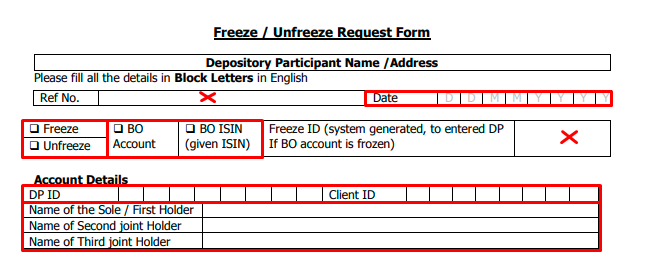
- Date: Enter the date on which you submit the instruction.
- Freeze or Unfreeze: Tick Freeze if you want to freeze your holdings, or tick Unfreeze if you want to unfreeze them.
- BO Account or BO ISIN: Tick BO Account if you want to freeze or unfreeze your entire demat account, or tick BO ISIN if you want to freeze or unfreeze specific stocks or securities.
- DP ID and Client ID: Enter your 8-digit DP ID and 8-digit Client ID.
- Account holder names: Enter the names of all the account holders.

- Security details: Enter the ISIN, the stock or security name, and the quantity that you want to freeze or unfreeze.
- Frozen For: Tick Debit if you want to freeze the securities so that you cannot sell or transfer them out, tick Credit if you want to block additional units from being credited, or tick Both to freeze both debit and credit transactions.
- Activation Type: Tick Current if you want to freeze or unfreeze the holdings immediately, or tick Future and enter the freeze activation date if you want to schedule the freeze or unfreeze for a later date.
- Reason For Freeze and Freeze Remarks: Enter the reason and any additional remarks for the freeze or unfreeze request, which CDSL records in your demat statement.
- Name and signature of the account holder(s): Enter the names and signatures of all the account holders.
Things to keep in mind
- Zerodha and CDSL do not charge any fee to freeze or unfreeze instruments in your demat account.
- You can freeze all types of securities in your demat account, including stocks, mutual funds, and Government Securities (G-Secs), unless a compulsory lock-in already applies to them.
- On CDSL Easiest, you can only unfreeze the freezes that you set up from your own Easiest login. If you set up a freeze by submitting the Freeze/Unfreeze Request Form to Zerodha, you must submit the form again to remove the freeze.
- Zerodha processes offline freeze and unfreeze requests within 72 working hours.
- If you freeze your stocks or securities for debit, you cannot sell them on Kite or transfer them to another demat account until you unfreeze them.
- If you freeze your demat account for credit, CDSL blocks the credit of any stocks you buy, and credits from corporate actions such as bonus issues and stock splits may also fail. You must unfreeze your demat account before buying stocks.
- For joint demat accounts, the CDSL Easiest login links directly to the demat account, so any freeze you set up on Easiest applies to all account holders.
- You cannot use CDSL Easiest or submit a form to Zerodha to remove freezes placed by regulatory or statutory authorities such as the Securities and Exchange Board of India (SEBI), the Income Tax Department (ITD), or the Central Bureau of Investigation (CBI). To unfreeze instruments that these authorities have frozen, you must send an email directly to CDSL at [email protected].