


Statement of Holdings (SOH) is a summary of all securities you hold in your demat account on a particular date and provides a breakdown based on the status of those securities. You can download your SOH by registering for CDSL easi or by creating a ticket.The statement of holdings is a summary of all the securities held in the demat account on a particular date and gives a bifurcation based on the status of those securities. SOH can be downloaded by registering in
CDSL easi
or by
creating a ticket.
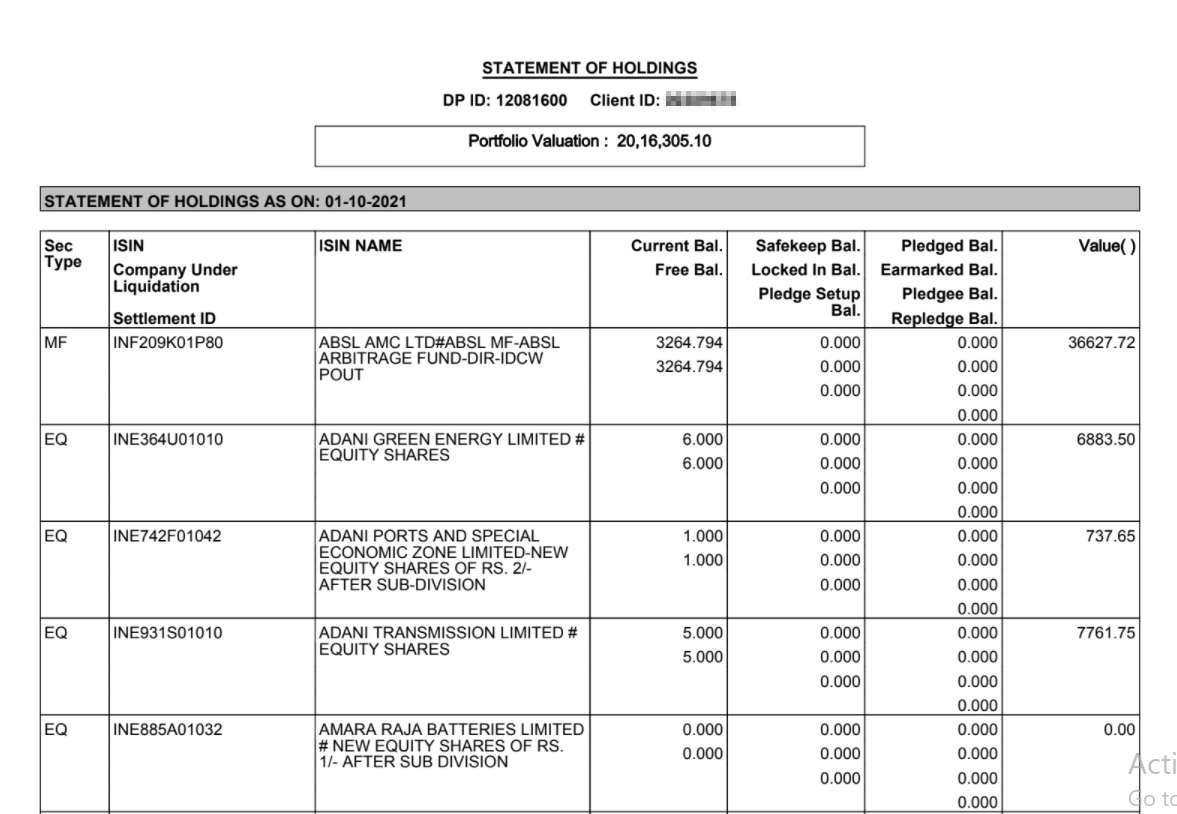
Information available in your SOH
- Sec Type: This column displays the type of security you hold, such as Equity (EQ), Mutual funds (MF), Debt (debt funds), G-sec (government securities), etc.
- ISIN: This column displays the International Securities Identification Number (ISIN). ISIN is a 12-digit alphanumeric code that uniquely identifies specific securities.
- ISIN Name: This column displays the name of the company along with the type of security and its face value.
- Current Balance: This column displays the total balance of securities you currently hold in your demat account. It can be further subdivided based on their status as free, locked-in, and pledged balances.
- Free Balance: This column displays the units of securities that are available for trading. Any sale (debit) transactions are adjusted against this free balance.
- Locked In Balance: This column displays the units of securities under lock-in that you cannot sell.
- Pledge Setup Balance: This column displays the units of securities pending your approval for the pledge.
- Safekeep Balance: This column displays the units of securities you have moved to safekeep balance so that they cannot be sold without an instruction.
- Pledged Balance: This column displays the securities you have pledged with your broker.
- Earmarked Balance: This column displays the units of securities that are designated to the exchange for clearance.
- Pledgee Balance: This column displays the units of securities pledged in favour of you as the demat account holder.
- Re-pledge Balance: This column displays the securities that your broker has pledged and re-pledged again with the exchange under some circumstances, such as margin pledge.