


You can change your signature by couriering the required documents or by visiting the Zerodha Customer Support Centre. You can view your signature, which you uploaded during the account opening process, through Console
You need the following documents if you are couriering them or handing them over at any branch office:
-
Account modification form
(PDF):
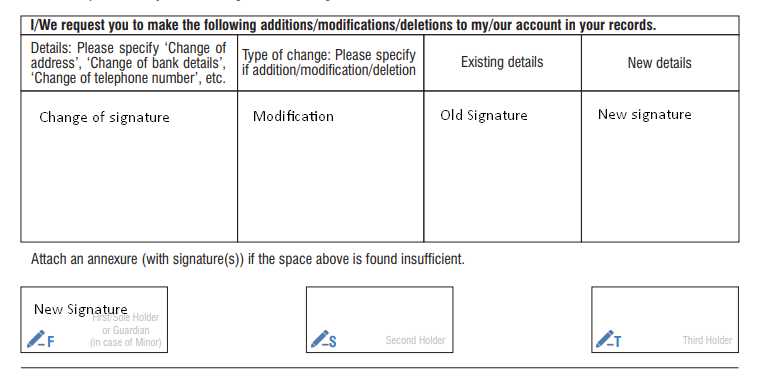
The following have to be filled in the account modification form:
- Details: Change of signature.
- Type of change: Modification.
- Existing details: Old signature
- New details: New signature.
- New signature in the F box.
- Banker's letter (PDF): The letter must have a passport-size photo with the new signature across it. The old and new signatures of the client and the banker's seal and signature.
- Self-attested copy of the PAN card.
-
Self-attested copy of the address proof. The address proof can be any one of the following: Driving license, Voter ID, Passport or Aadhaar. If an Aadhaar is being submitted as proof, ensure that a
masked Aadhaar
is submitted.
Submission process
- Prepare all documents listed above.
- Email soft copies of the forms to [email protected] for review.
- Wait for the review process to complete and any necessary corrections to be identified.
- Courier the documents to:
Zerodha Customer Support Centre
192A 4th Floor,
Kalyani Vista, 3rd Main Road,
JP Nagar 4th Phase,
Bengaluru, 560076
You can check the sample account modification, KYC forms (PDF) and banker letter (PDF) for reference
If you visit the head office, you need the following documents:
- Account modification form (PDF), which must be signed in the presence of a Zerodha employee.
- Self-attested copy of the PAN card.
- Self-attested copy of the address proof. The address proof can be any of the following: Driving license, Voter ID, Passport or Aadhaar. If an Aadhaar is being submitted as proof, ensure that a masked Aadhaar is submitted.
Charges: Modification charges of ₹25 + 18% GST are applicable.
Processing time: Your signature will be updated within 72 working hours.