


You can gift stocks, Exchange Traded Funds (ETFs), and mutual funds online to anyone who holds a Zerodha account. If the recipient does not have a Zerodha account, they can open a Zerodha demat account online to receive the gift.
To gift stocks on Kite, follow these steps:
- Log in to Kite.
- Click on Holdings.
- Hover over the security to be gifted and click on Options.
- Click on Send as a gift.
- Enter the gift receiver's name, mobile number, email address (optional), and gift message (optional).
- Click on Continue.
-
Select the securities you want to gift.
You can only
gift from the approved list of securities.
- Enter the quantity.
-
Click on
Confirm & send.

Authorising the gift transfer
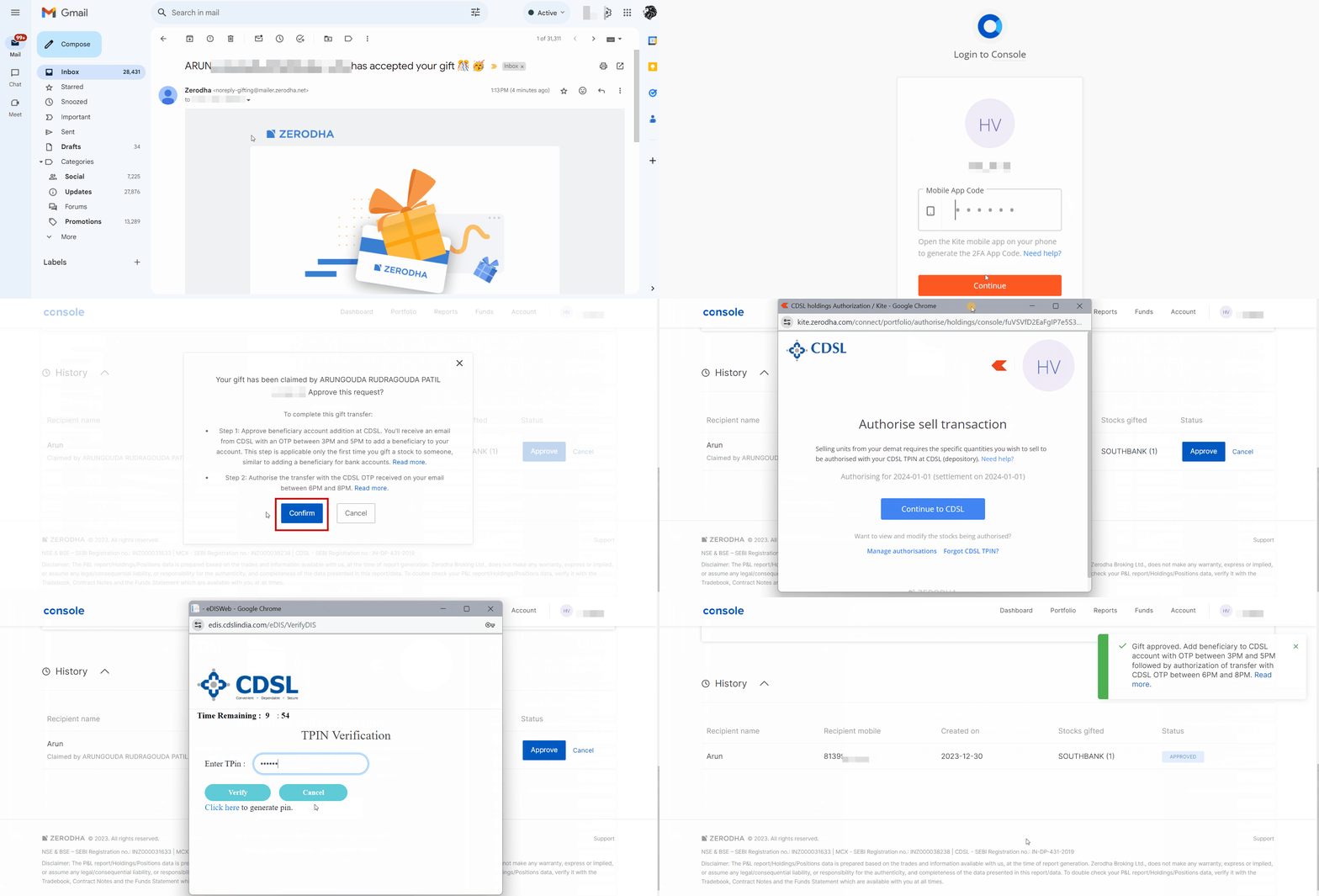
After you send the gift request, Zerodha sends an email and SMS notification to the recipient asking them to accept the gifted securities within 7 days. Zerodha does not transfer the stocks out of your demat account at this stage.
Once the recipient accepts the gift, Zerodha sends you an email and SMS notification to confirm the recipient's identity and authorise the stock transfer using your Central Depository Services Limited (CDSL) Transaction Personal Identification Number (TPIN). If you do not have your TPIN, you can generate a new CDSL TPIN to authorise the transaction.
The daily cut-off time to process TPIN verification for gifts is 2:00 PM:
- Before 2:00 PM: If you complete TPIN verification before 2:00 PM, Zerodha sets up the beneficiary, and CDSL sends you an email on the same day to verify the beneficiary.
- After 2:00 PM: If you complete TPIN verification after 2:00 PM, CDSL sends you the beneficiary verification email on the next trading day.
Verifying the beneficiary and confirming the CDSL transfer
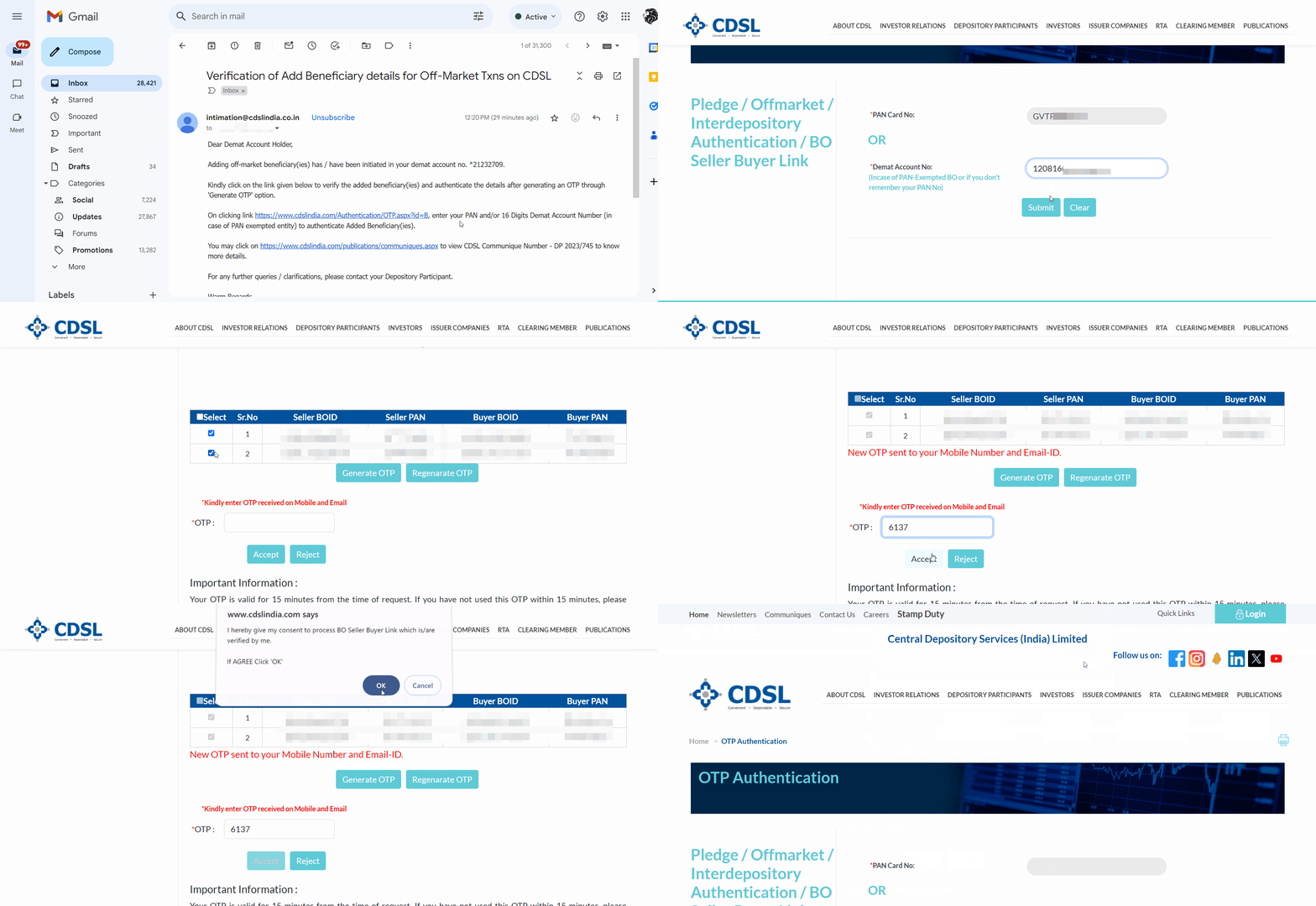
If you have already verified the recipient as a beneficiary, you can skip the beneficiary verification step. If you have not verified the recipient as a beneficiary, CDSL sends you an email between 3:00 PM and 5:00 PM on trading days to verify the beneficiary details for off-market transactions. You can also visit cdslindia.com/Authentication/OTP.aspx?id=B directly to verify the beneficiary:
1. Click on the link received in the mail.
2. Enter your PAN or
16-digit demat account number.
3. Click on
Submit.
4. Select the checkbox next to the beneficiary details and click on Generate OTP.
5. Enter the OTP and click on
Accept.
6. Click on
OK.
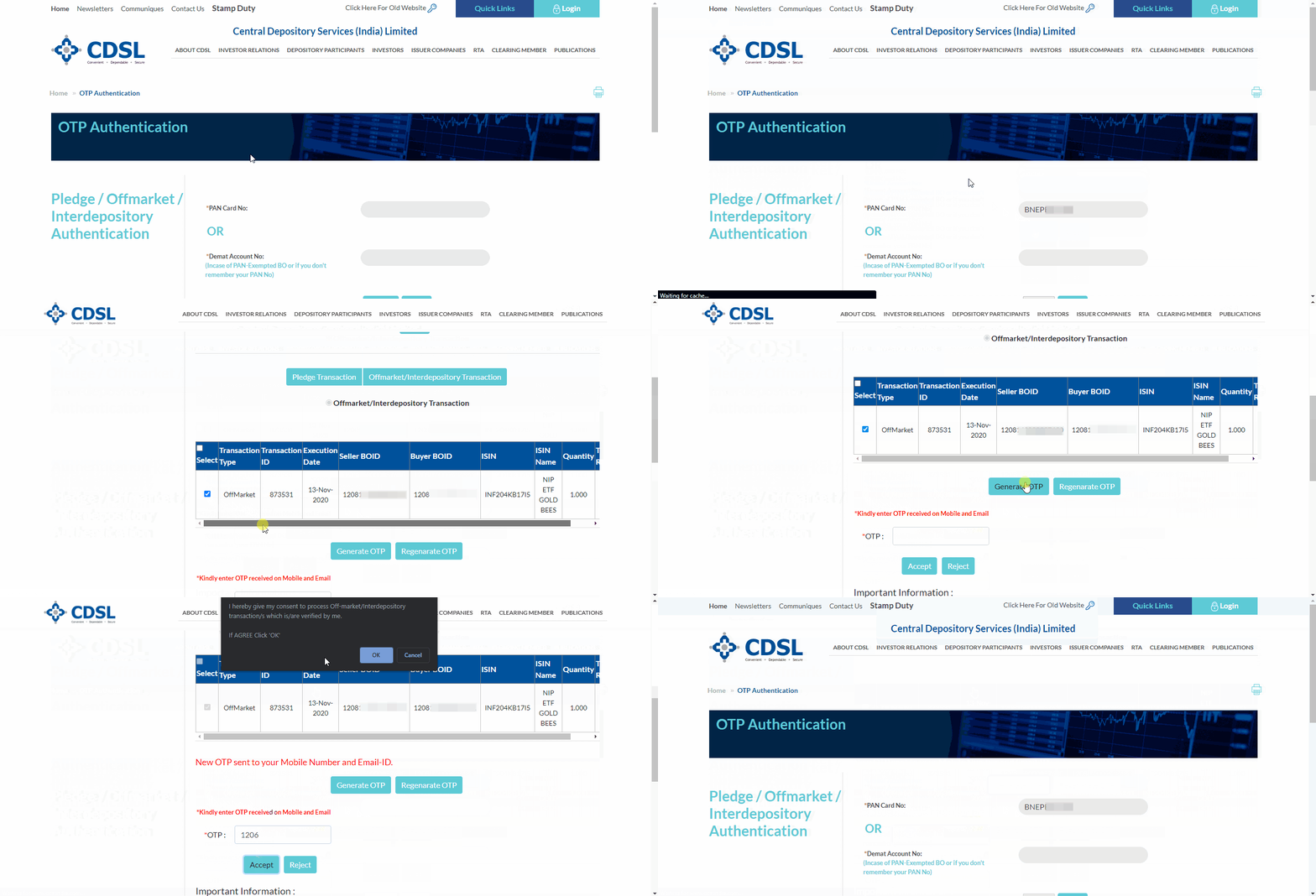
Once you verify the beneficiary, Zerodha sets up an off-market gift transfer through CDSL, which you must confirm using an OTP:
- CDSL sends you an email and SMS at 5:00 PM on the same trading day (or on the next trading day) to confirm the off-market gift transaction.
- Enter your PAN or 16-digit demat account ID and complete the SMS OTP verification by 8:00 PM on the same day. If you do not complete the OTP verification by 8:00 PM on the same day, the request expires, and you must reinitiate the gifting process.
- Once you complete the verification, CDSL transfers the securities to the recipient's demat account, and the securities appear in their holdings the next day.
Charges for gifting securities
Zerodha charges ₹25 per security, per transaction, plus 18% Goods and Services Tax (GST) for gifting securities, and automatically debits this amount from your account. You do not pay any additional charges for gifting stocks:
- If you transfer 10 stocks of HDFC, 5 stocks of Reliance, and 2 stocks of Infosys in a single transaction, Zerodha charges ₹75 plus 18% GST.
- If you transfer 10 stocks of HDFC across two separate transactions, Zerodha charges ₹50 plus 18% GST.
Taxes on gifted securities depend on their total value. If the combined value exceeds ₹50,000 in a single financial year, the recipient is liable for tax.
Things to keep in mind
- Zerodha does not process your gifting request if your account balance is zero or negative.
- For tracking and reporting purposes, Zerodha uses the stock's closing price on the transfer date as your exit price and as the recipient's entry price. Zerodha updates the buy average price within 3 working days after the stock transfer completes. You can take a different view on the acquisition price when you file your income tax return.
- You cannot gift unsettled stocks until the settlement cycle completes.
- You cannot gift stocks if your account is dormant. You must complete the Re-KYC process to reactivate your Zerodha account before gifting stocks.