


If you already have a Zerodha account, you can trade commodities by activating the commodity segment at account.zerodha.com. If you don't have one, you can open an account at signup.zerodha.com and select the commodity segment during the signup process.
You can activate the commodity segment online if your Aadhaar number is linked to your mobile number. If your mobile number is not linked to Aadhaar, or if you hold a joint demat account, you must apply offline.
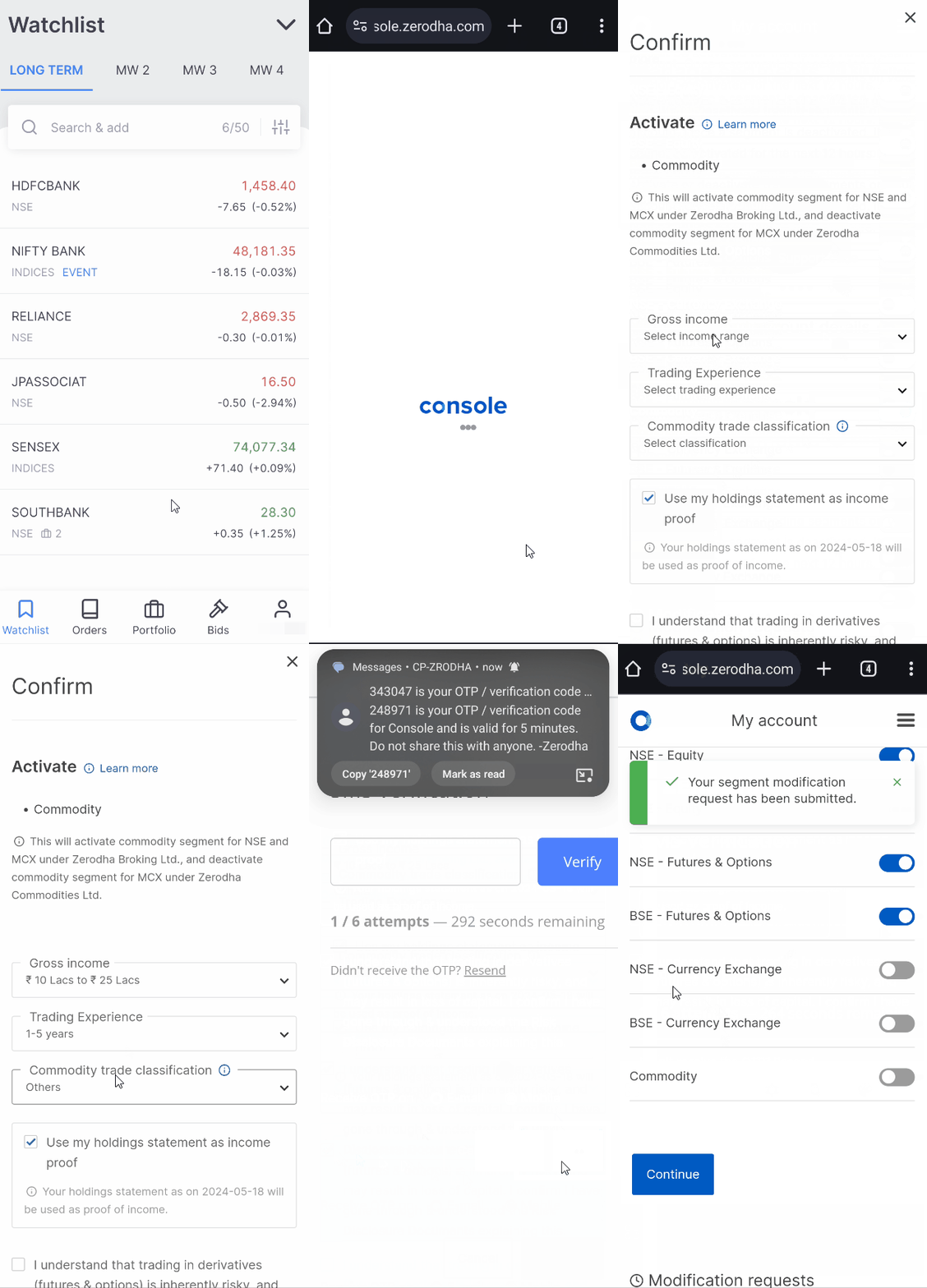
You can activate your commodity segment by following these steps:
Kite app
- Tap on User ID.
- Tap on Profile.
- Tap on Segments.
- Tap on Commodity and tap on Continue.
- Select Gross income, Trading experience, and Commodity trade classification¹.
- Upload income proof² or select holdings statement as income².
- Tap on the undertaking and select mobile or email for OTP.
-
Tap on
Continue,
enter the OTP, and tap on
Verify.
On Web
- Visit account.zerodha.com/account.
- Click on Login and log in with Kite credentials.
- Click on Activate Segments.
- Click on the toggle switch to select the commodity segment.
- Click on Apply changes.
- Select the income range.
- Select Submit bank statement via OTP, then click on Get OTP.
- Select the bank and click on Accept.
- Click on Sign Now
- Enter the Aadhaar number and click on Accept & Continue.
- Enter the OTP and Click on Verify OTP.
A new commodity account will be opened under Zerodha Broking Ltd within 72 working hours upon verification.
Offline
Courier the segment addition forms (PDF) and self-attested income proof² to the following address:
Zerodha Customer Support Centre
#192A, 4th Floor, Kalyani Vista
3rd Main Road, JP Nagar 4th Phase
Bengaluru 560076
Refer to the sample forms (PDF).
Things to keep in mind
- The commodity segment will be activated within 72 working hours.
- Clients with a registered address in the state of Sikkim must submit a domicile certificate to activate the MCX segments on their account.
- Sale proceeds from holdings can only be used from T+1 day to trade in commodity futures and options on NSE and MCX.
- As per SEBI Circular, interoperability is not applicable to commodity derivatives. Positions held across exchanges like MCX and NSE in commodity contracts cannot be transferred or netted off through the interoperability mechanism.
- Regular fund withdrawal requests are processed at 11:59 PM. However, you can submit instant withdrawal requests once per day between 9:00 AM and 4:00 PM on any day, including weekends.
Note
¹Clients are required to select the classification based on the category they come under:
- Farmers/FPOs: If a client is a farmer, part of farmers’ cooperatives, or belongs to Farmers Producers Organisations (FPOs).
- Value chain participants (VCPs): If a client is a processor, commercial user as dal and flour miller, importer, exporter, physical market trader, stockist, Cash & Carry participant, producer, SME/MSME & Wholesaler etc., but not a farmer or an FPO.
- Others: If a client intends to trade on MCX and does not belong to any of the above classifications.
²Income proof can be any of the following:
- Bank statement in the name of the Zerodha account holder with the bank logo and seal for the last 6 months with an average balance of more than ₹10,000.
- Latest salary slip with gross monthly income exceeding ₹15,000.
- Latest ITR acknowledgement with gross annual income exceeding ₹1,20,000.
- Form 16 with gross annual income exceeding ₹1,20,000.
- Certificate of net worth more than ₹10,00,000.
- Latest statement of demat holdings with current holdings value exceeding ₹10,000. (Your holdings must not be pledged)
- Latest Fixed Deposit (FD) receipt with a deposit amount exceeding ₹1,00,000.