


You can use a stoploss-limit (SL) order to function like a stoploss-market (SLM) order by setting your limit price significantly above or below the trigger price. This gives you market order-like execution whilst protecting against freak trades.
Understanding freak trades
A freak trade occurs when your order executes at a price significantly different from the current market price. These trades happen due to shallow market depth or when your order coincides with a large market order.
Market orders risk freak trades, whilst limit orders protect against unexpected price movements but may not execute.
How stoploss orders work
Stoploss orders trigger at a specified price within the exchange system. When the market reaches your trigger price, the exchange places either a limit order or market order.
You can make an SL-L (stoploss limit) order behave like an SL-M (stoploss market) order by setting your limit price higher (for buy orders) or lower (for sell orders) than the trigger price.
Using SL-L as SL-M for short positions
Example scenario:
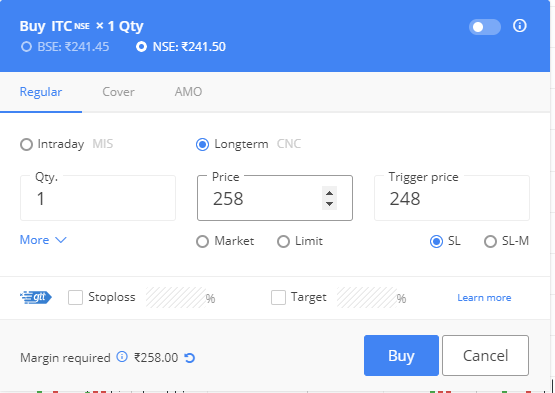
- Stock: ITC
- Position: Short
- Short price: ₹245
- Current market price (CMP): ₹241
- SL trigger: ₹248
- SL limit: ₹258
When the market price reaches ₹248, the exchange places your SL limit buy order at ₹258. Since ₹258 is significantly higher than the current price, your order will execute immediately between ₹248 and ₹258.
If a large market order coincides with yours, the ₹258 limit price protects you from a freak trade.
Using SL-L as SL-M for long positions
Example scenario:
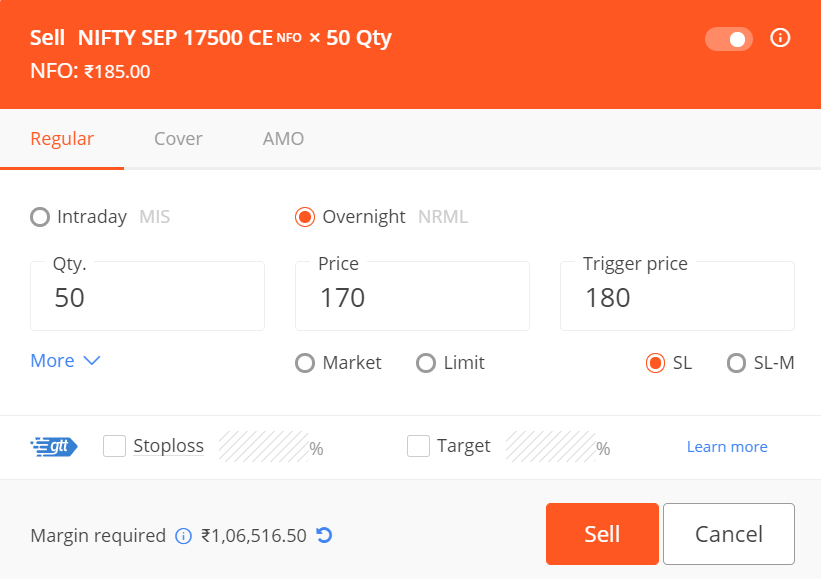
- You hold a long position on Nifty 17500 CE at ₹185.
- You place an SL limit sell order at ₹170, triggered at ₹180.
- When the market hits ₹180, your order executes immediately since ₹170 is below the current price.
- Your position sells for up to ₹170, protecting you from selling lower if a freak trade occurs.
You can also use limit order like a market order.
Did you know? NSE has stopped supporting SL-M order type for options from Sep 27th 2021.