


You can use Iceberg orders to slice large orders into smaller portions that execute sequentially, helping you reduce impact costs and keep your large orders hidden from market participants.
Iceberg orders work by dividing your large order into smaller legs, where each leg executes only after the previous one completes. You can only use Limit and Stoploss Limit (SL-L) order types with Iceberg orders.
How impact costs affect large orders
Impact cost represents the difference between your actual execution price and the instrument's price when you placed your order. For example, if you place a market order to buy 1000 shares when the stock trades at ₹100, and your actual execution price becomes ₹100.5, you pay an impact cost of ₹0.5 × 1000 = ₹500.
Similarly, if you place a limit order to buy 1000 shares at ₹100 when the stock trades at ₹100, then modify it to ₹100.3 to get execution, your impact cost becomes ₹0.3 × 1000 = ₹300.
Your impact costs increase as your order size grows. Large orders often result in impact costs that exceed all other trading charges combined, including STT, brokerage, and exchange transaction fees.
How Iceberg orders work
When you place a large order, Iceberg divides it into smaller legs and sends only the first leg to the exchange initially, revealing just the tip of your order. Once this leg executes, the system automatically places the next leg, continuing until you achieve your desired quantity. You decide how many legs to create for your order.
How to place an Iceberg order
- Click on Iceberg in the order window.
- Select Intraday or Overnight.
- Enter your Quantity and Price.
- Select Limit.
- Enter the Number of legs and click on Buy or Sell.
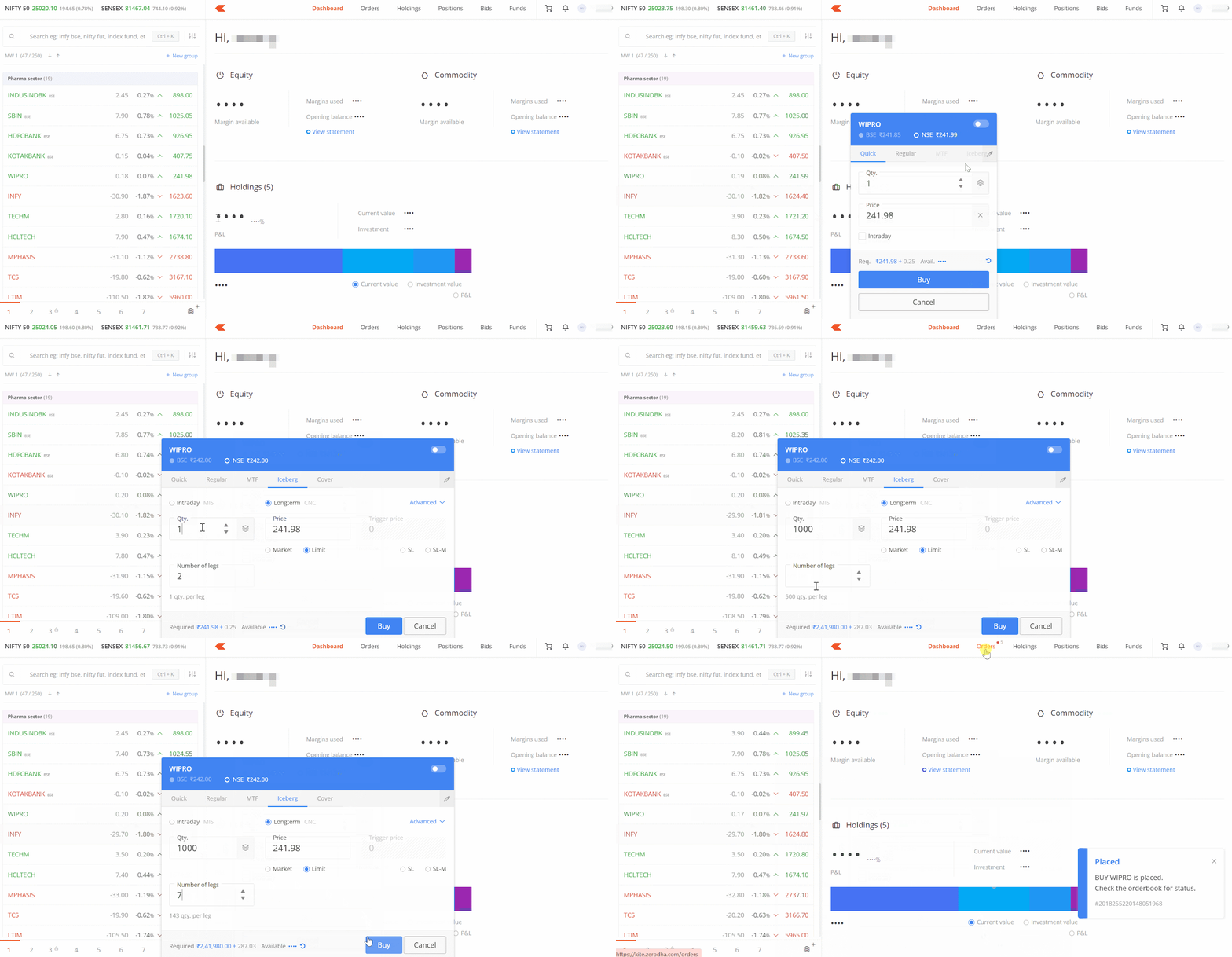
You can create up to 50 legs per Iceberg order.
Example scenario
You can divide a Nifty CE order of 6500 quantity (100 lots) into 5 orders of 1300 (20 lots) each by selecting 5 legs. Each subsequent order of 1300 will execute only after the previous order is completed.
Using limit orders as market orders
You can use limit orders as market orders with Iceberg. When you place a buy limit order above the current market price, it functions as a market order while offering market protection at your specified limit price. Similarly, when you set a sell limit order below the current market price, it also functions like a market order.
During execution, if the market price rises above your limit price for a buy order, some legs of your order may remain pending. For sell orders, if the market price drops below your limit price during execution, certain legs may remain pending.
Overcoming order freeze limits
Exchanges set maximum order limits for equity derivative contracts, defining freeze limits as the maximum number of contracts you can buy or sell in a single order. With Iceberg orders, you can place orders for up to 1,75,500 quantities or 2700 lots of Nifty. This eliminates the need to place multiple orders for large quantities and helps reduce impact costs.
You can check freeze quantity limits under Volume Freeze Quantity on the NSE website.
Order validity in minutes
Along with DAY (valid for the whole trading day until filled) and IOC (Immediate or Cancel) orders, you can set Iceberg orders to auto-cancel if they don't complete within a specified time period measured in minutes.
Things to keep in mind
- Each leg counts as a separate order, so you pay brokerage separately for each leg. If your order splits into 5 legs, you pay brokerage for 5 individual executed orders
- In Stoploss Limit (SL-L) orders, once the trigger price crosses, each leg executes sequentially as a limit order, with the next leg sent only after the previous leg's execution
- If you cancel any leg of an Iceberg order, all remaining pending legs automatically cancel. Similarly, if you modify the price of any leg, the new price applies automatically to all pending legs
- Minimum order value is ₹1,00,000 for equity and 5 lots for F&O
- Iceberg orders are available for NSE equity, NFO (NSE F&O), CDS (NSE currency segment), BSE equity and BFO (BSE F&O) only. Iceberg orders are not available for MCX and BCD yet
- You cannot use Iceberg orders with market and SL-M order types
- Iceberg orders and minute validity are not supported during pre-open and post-market sessions
- For equity trades, you can use the disclosed quantity feature, which works similarly to Iceberg orders without creating multiple orders, avoiding additional costs. Disclosed quantity is not available for F&O trades