


Stock SIPs (Systematic Investment Plans) let you invest a fixed amount in stocks at regular intervals automatically. You can use this feature only for delivery trades in the cash market.
Kite web
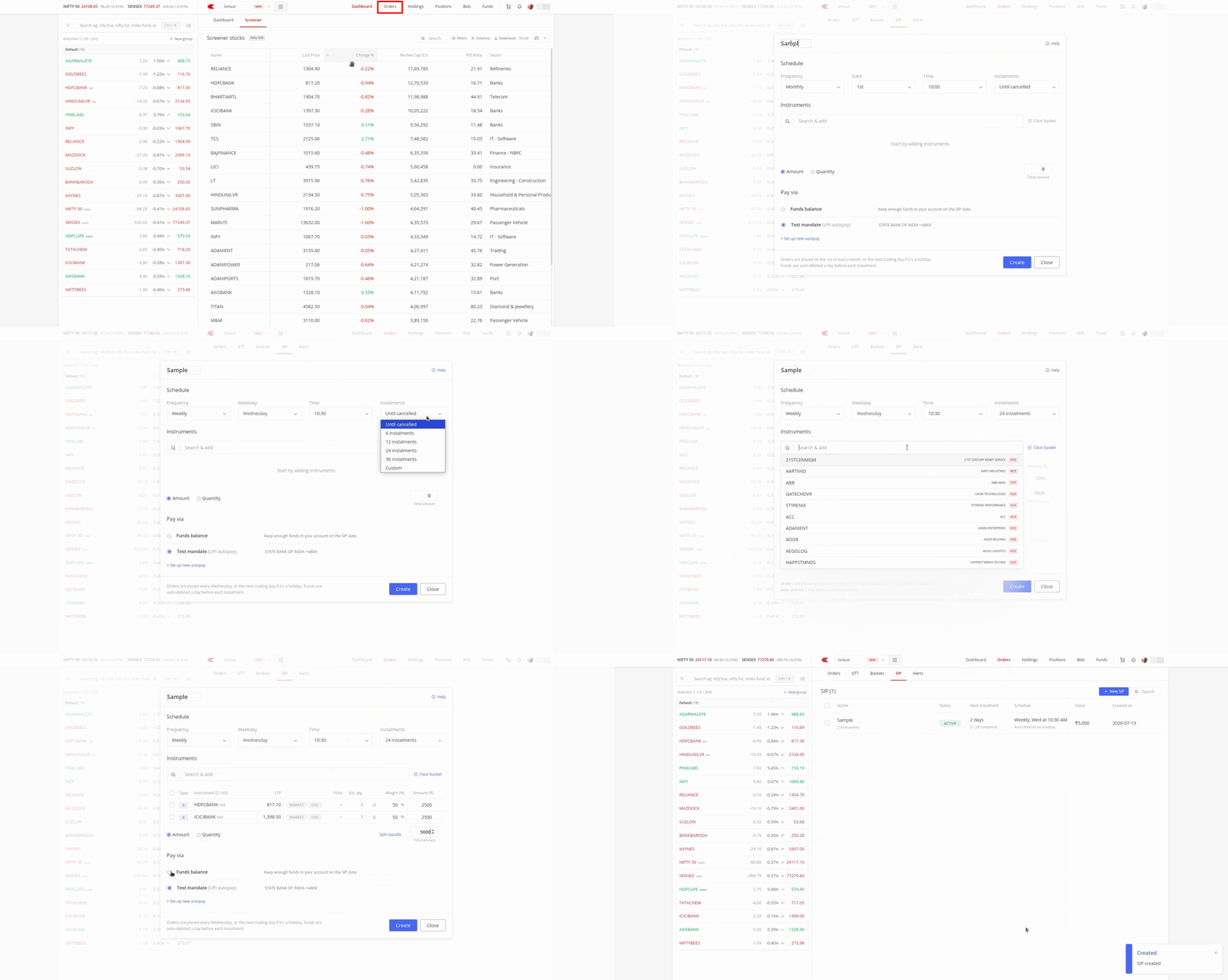
- Click on Orders.
- Click on SIP.
- Click on New SIP.
- Enter your SIP name.
- Select the frequency, date, time, and number of instalments.
- Search and add the instruments you want.
-
Choose whether to invest by amount or quantity:
- If you select Amount, you can edit the weightage percentage or amount for each instrument. You can also distribute the amount equally by clicking on Split equally.
- If you select Quantity, you can directly edit the quantity for each instrument.
- If you selected Amount, you can set up autopay. Autopay is not available when Quantity is selected.
- Click on Create.
On Kite app
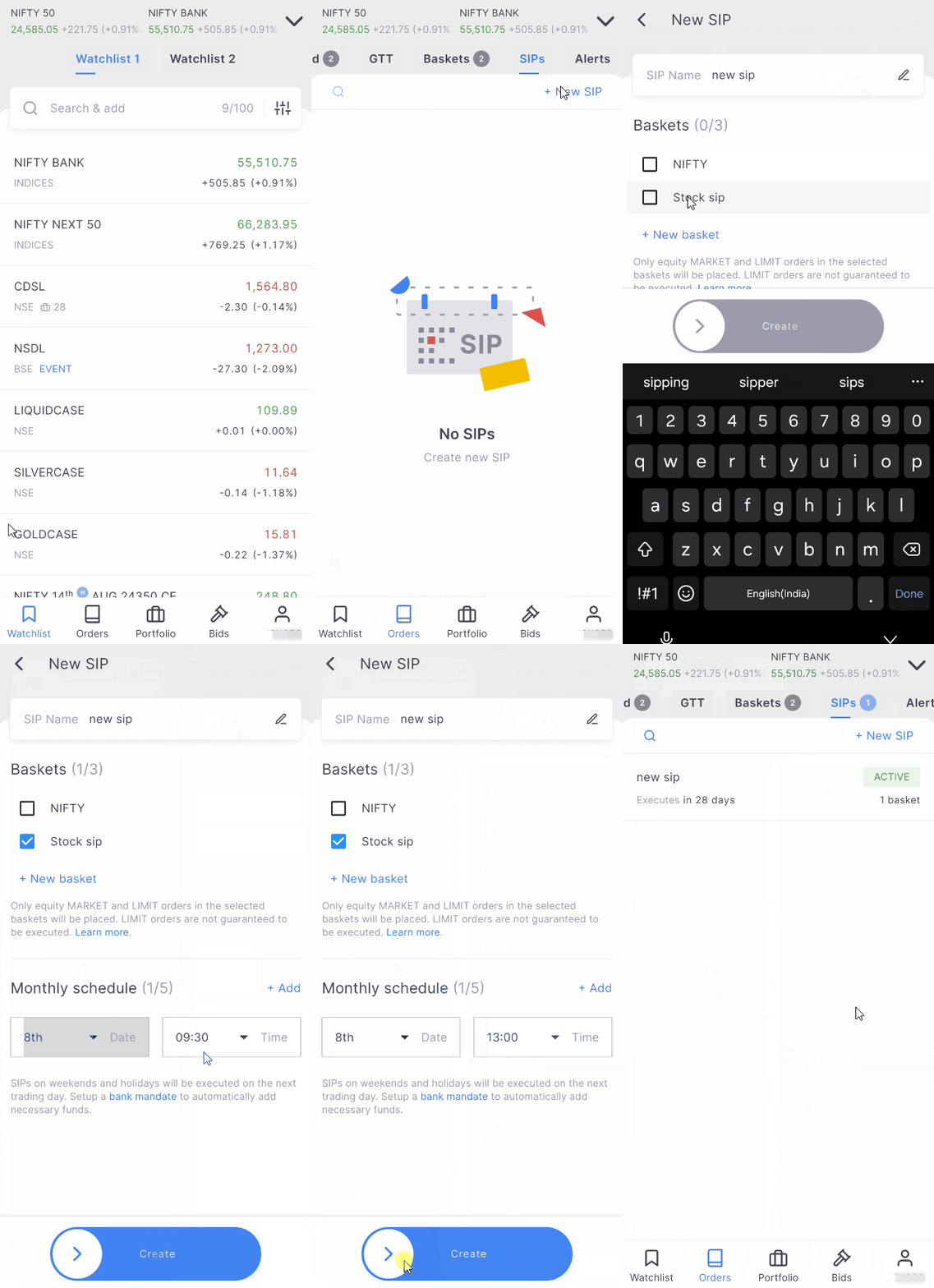
- Tap on Orders.
- Tap on SIPs.
- Tap on New SIP.
- Enter your SIP name.
- Link an existing basket of orders or create a new basket by tapping on New basket.
- Select your basket and set your preferred scheduled date and time.
- Swipe on Create.
SIP types
- Amount-based: You set a total rupee amount to invest, and Zerodha calculates how many whole shares to buy to match your target weights. The default total is ₹5,000, which you can customise. Use Split equally to distribute the amount evenly across all instruments. Use the Lock feature to freeze the weightage of specific instruments, keeping their allocations unchanged even if you adjust the overall investment amount. Since fractional share trading is not permitted in India, Zerodha rounds down to the nearest whole share, and any unused cash stays in your trading account.
- Quantity-based: You specify how many shares of each stock to buy at each interval, regardless of the price. The SIP screen shows the approximate amount required based on the last traded price. Ensure you maintain sufficient funds in your trading account on the scheduled date. The autopay option and the Lock feature are not available for quantity-based SIPs.
Payment modes
- Zerodha fund balance: Stock SIP uses the funds available in your Zerodha account. Ensure you maintain sufficient funds by your SIP date.
- UPI Autopay: Available only for amount-based SIPs. Click on Set up Autopay, enter the mandate name, select your bank, enter your UPI ID, and accept the terms and conditions. Approve the autopay request on your UPI app to complete the setup. Zerodha debits your bank account one day before your scheduled SIP date.
Scheduling your SIPs
You can set your SIP frequency to daily, weekly, or monthly, and choose the time of order placement. You can also set the number of instalments: 6, 12, 24, 36, a custom number, or Until Cancelled.
If a monthly SIP date falls on a trading holiday, or if you scheduled it for the 31st and that date is unavailable for that month, your order executes on the next trading day. Daily SIPs execute between Monday and Friday only.
How to modify a stock SIP
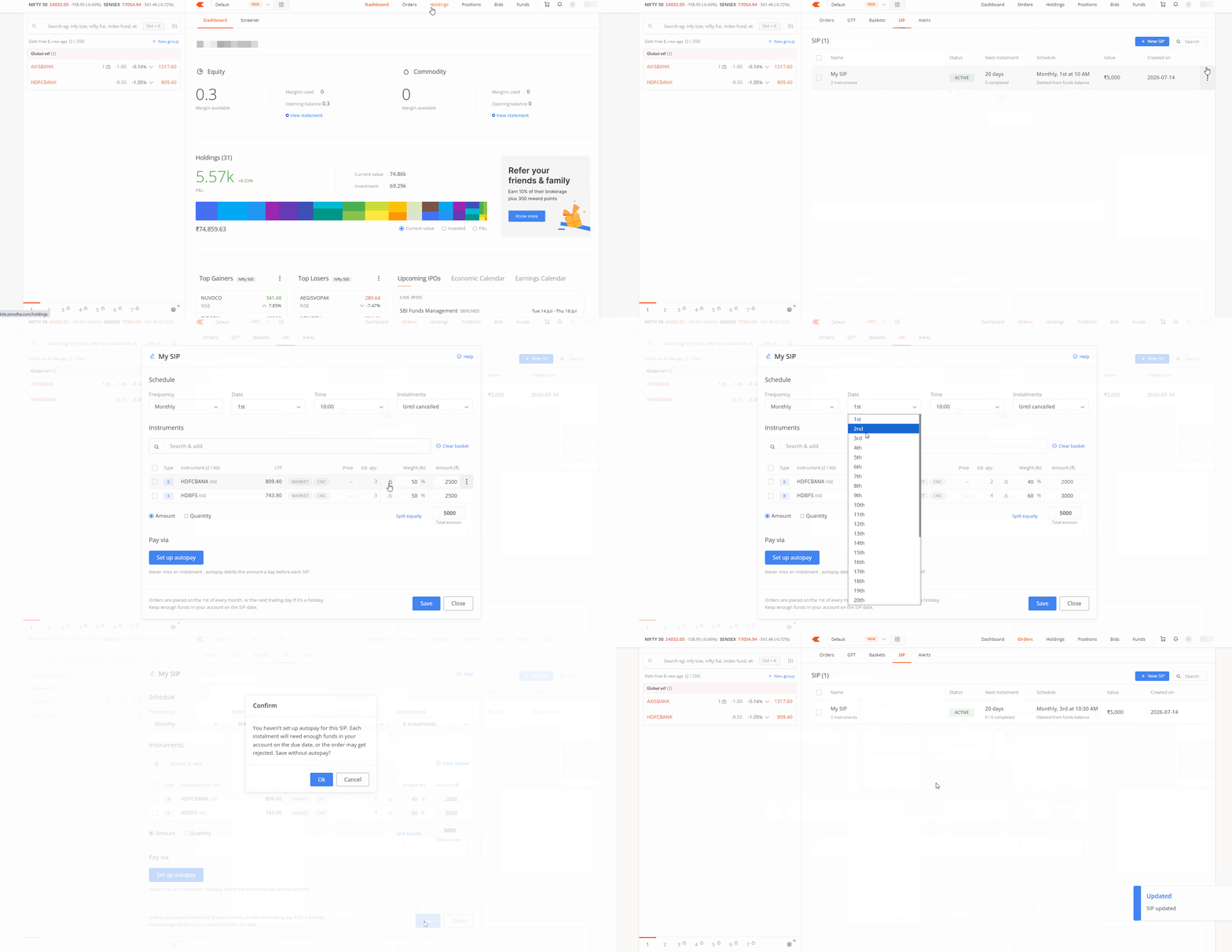
Select the specific SIP or choose Edit from the options menu. You can update the frequency, date, time, number of instalments, or payment mode. To adjust the price or quantity, manage those changes within the order window for that specific instrument.
From the options menu, you can also pause, resume, skip the next instalment, or delete the SIP.
Things to keep in mind
- Execution: By default, stock SIPs execute using market orders with market protection. You can switch to a limit order, but your order may not execute if the stock price moves away from your limit before it triggers.
- Instalments: Once you reach the selected number of instalments, the SIP status updates to Completed.
- Existing SIPs: SIPs created before this update remain unaffected and continue to execute on their original schedule. If an existing SIP has multiple schedules, you cannot modify it directly. Remove the extra schedules first to make changes.
-
Availability:
This feature is currently live on Kite web and is rolling out to the Kite app. During this transition, SIPs created on Kite web open as a basket view on the app. You can modify monthly SIPs during this transition, but not daily or weekly SIPs.