


You can pre-apply for mainboard IPOs one day before the IPO window opens. Your pre-application will be automatically sent to the exchange once the IPO window opens, and you will receive a UPI mandate that must be accepted before the IPO window closes.
To pre-apply for an IPO on Kite, follow these steps:
Kite app
- Click on Bids.
- Click on IPO.
-
The list of IPOs will be displayed, select the IPO and tap on
Pre-apply.
- Select investor type - Individual or Employee.
- Tap on Pre-apply.
- Enter the UPI ID.
- Enter or edit the Quantity and the Price.
- Swipe on the Submit button.

Accept the mandate on the UPI app. It will be sent after 10 AM on the IPO start date.
Kite web
- Login to Kite.
- Click on Bids.
- Click on IPO.
- The list of IPOs will be displayed, select the IPO and click on Pre-apply.
- Select investor type - Individual or Employee.
- Enter the UPI ID.
- Enter or edit the Quantity and the Price.
- Click on Submit.
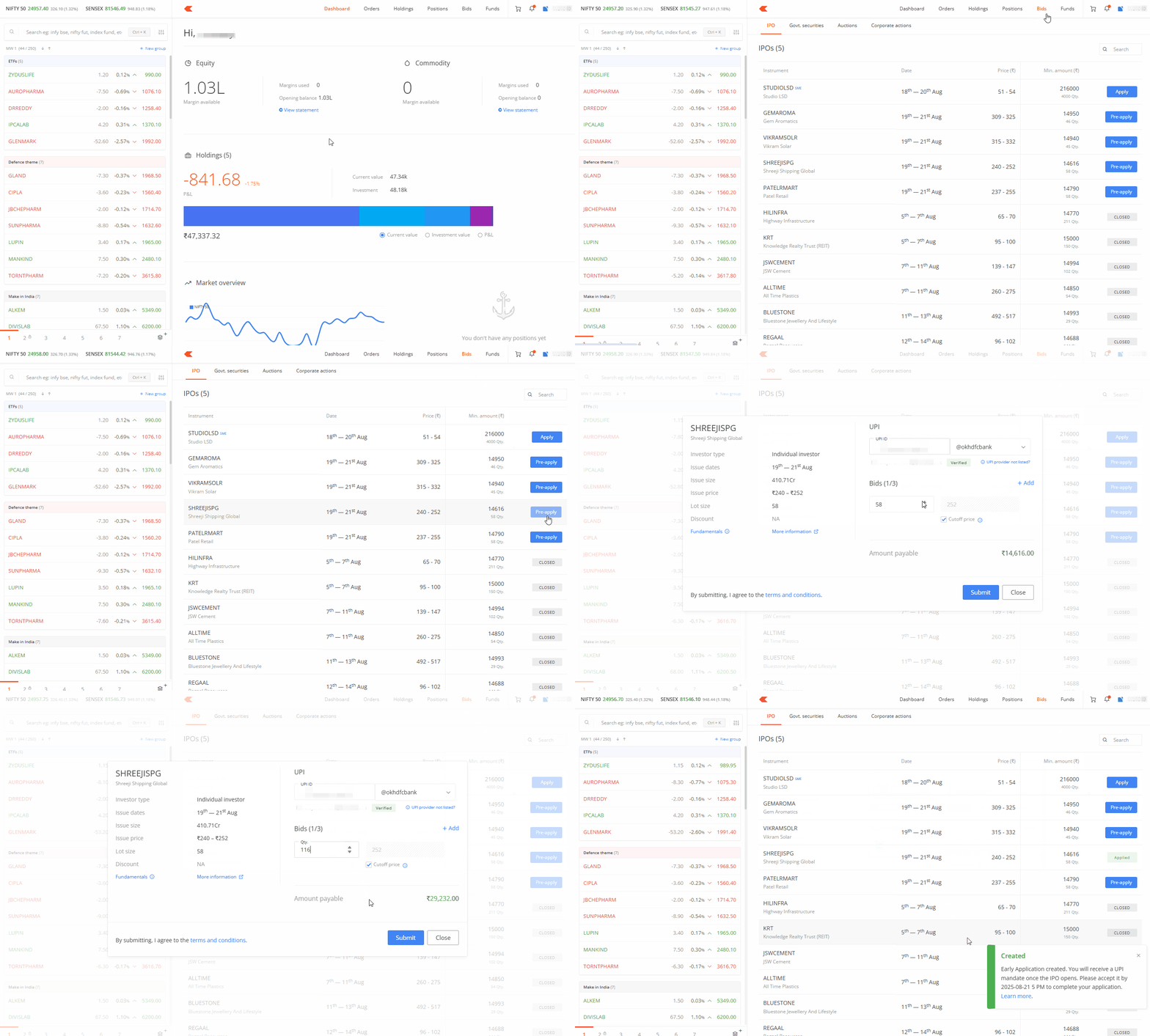
Accept the UPI mandate request that you will receive after 10 AM on the IPO start date.
Things to keep in mind
- You can use the pre-apply option from one day before the IPO launch until 10:00 AM on the issue open date. After this time, you can use the regular apply option.
- Your chances of allotment remain the same regardless of when you apply for the IPO.
- Pre-apply is not available for SME IPOs.
-
Zerodha initially did not offer pre-IPO orders due to regulatory clarity concerns. Although regulations do not specifically define pre-IPO applications, regulators and exchanges understand that brokers can collect pre-IPO orders.