


You can create a Systematic Withdrawal Plan (SWP) to make regular withdrawals from your mutual fund holdings to your primary bank account linked to Zerodha. SWP works by selling part of your mutual fund holdings periodically.
You can create an SWP by following these steps:
Coin app
- Tap on Investments.
- Select the fund from the portfolio section and tap on it.
- Tap on ፧ and then on SWP.
- Enter the withdrawal amount.
- Select the frequency.
-
Tap on
Create SWP.

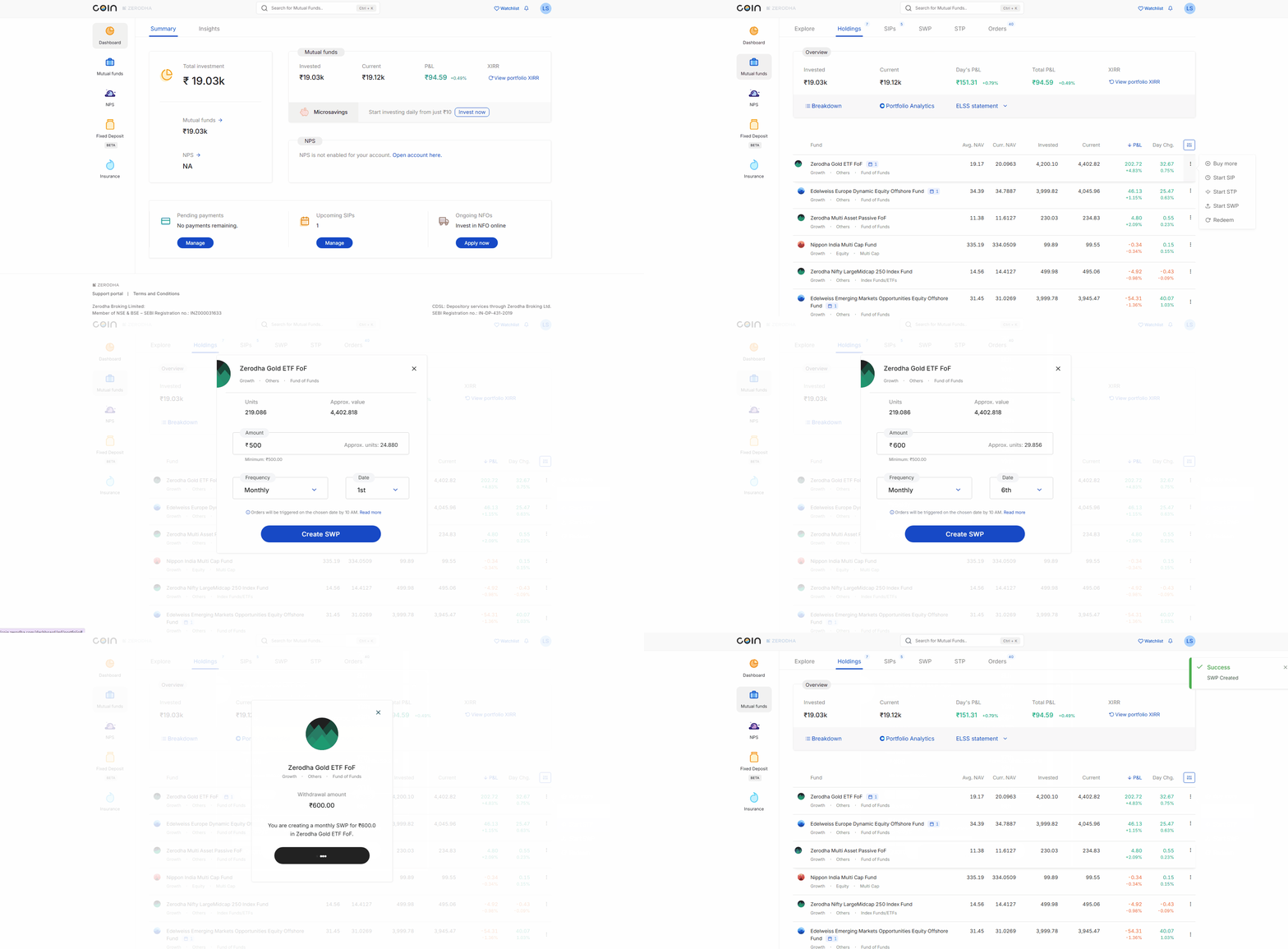
Coin web
- From Dashboard, click on Mutual funds.
- Hover over the fund from the Holdings section and click on the ፧ context menu.
- Click on Start SWP
- Enter the withdrawal amount
- Select the Frequency and Date
-
Click on
Create SWP
Your redemption frequency date determines how many units Zerodha redeems based on your specified amount. The number of units redeemed for your SWP is determined based on the NAV of the previous trading day (T-1).
Your SWP orders will be executed by 10:00 AM on your selected date. If your Zerodha account doesn't have DDPI/POA enabled, you must authorise units on CDSL for redemption on the specified date before 3 PM.
Did you know? Pledged units must be unpledged before placing SWP. If not, the order will be rejected.