


To rename a mandate on Coin web, follow these steps:
On Kite app
- Tap on Account.
- Tap on Mandates.
- Select the mandate.
- Enter the mandate name and tap on Save.

On Kite Web
- Log in to Coin.
- Click on profile and then on Mandates.
-
Select the mandate.
- Enter the mandate name and click on Save.
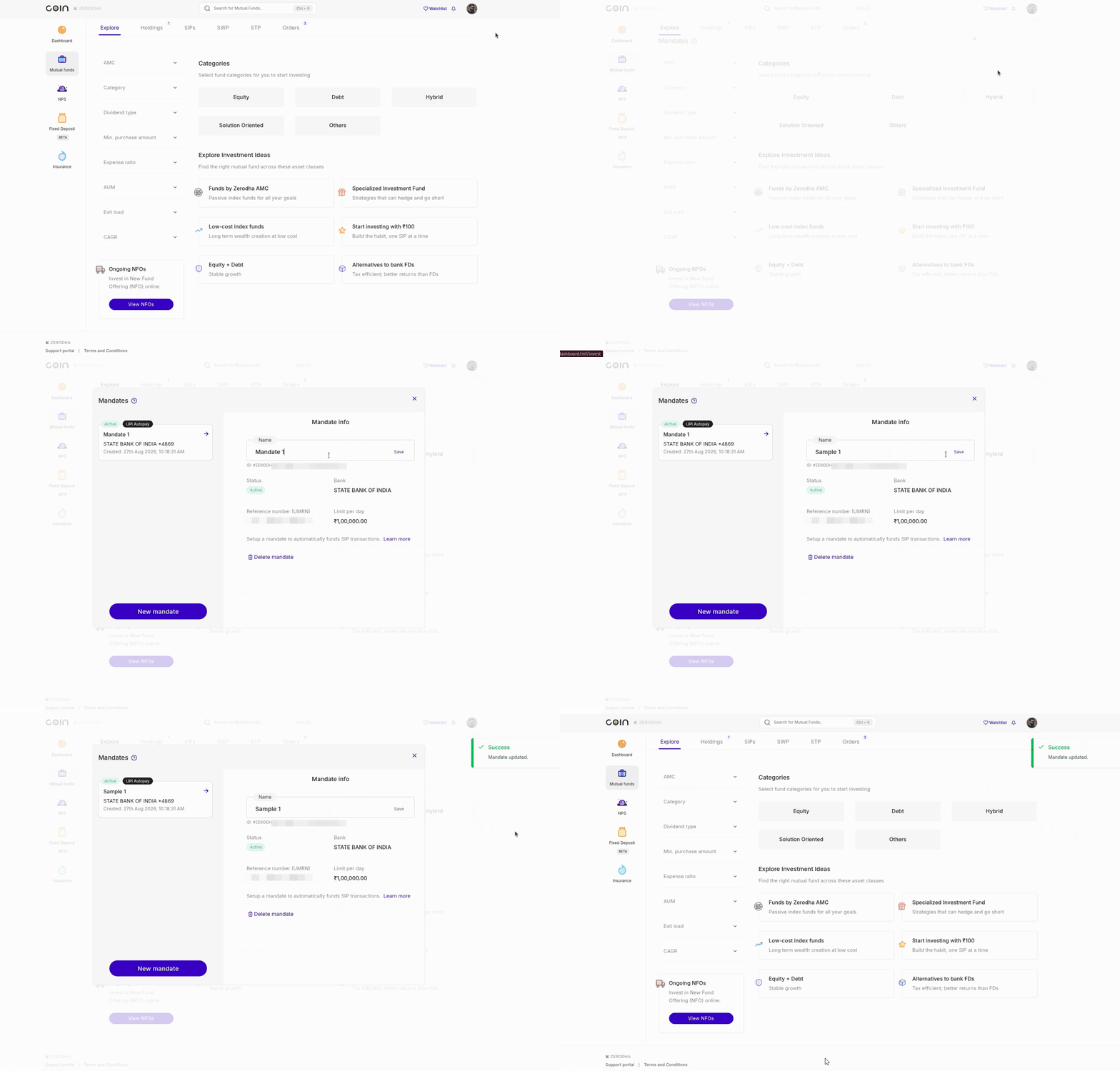
To modify or delete a mandate, all the linked active and paused SIPs must first be unlinked. You can unlink the mandate only from a Coin SIP. You cannot unlink a mandate from an AMC SIP. To unlink and modify/delete a mandate, follow these steps:
-
Log in to
Coin.
- Click on profile and then on Mandates.
- Click on Edit and then on Unlink.
- Select None from the Mandates drop down.
- Click on Modify and then on Confirm.
- Click on Edit.
- Click on Delete mandate and then on Confirm.

Things to keep in mind
- You need an active mandate to create a new AMC SIP or modify an existing one. Any AMC SIPs you created without a mandate continue to trigger orders normally. You can modify existing AMC SIPs to link a mandate, or complete payments for triggered orders manually on Coin.
- The mandate name has a maximum character limit of 20, permitting alphanumeric values and the special character '-'. Spaces are not allowed in mandate names.