


A Trailing Stoploss (TSL) is a stoploss order whose trigger price adjusts automatically as the market moves in your favour. Unlike a standard stoploss, which stays at a fixed price, a TSL trails the market price by a fixed gap called the trailing point.
When the market moves against you, the trigger freezes at the last adjusted level.
- For a sell position, the trigger moves up as the price rises.
- For a buy position, the trigger moves down as the price falls.
On Kite, TSL is available on GTT (Good Till Triggered) orders.
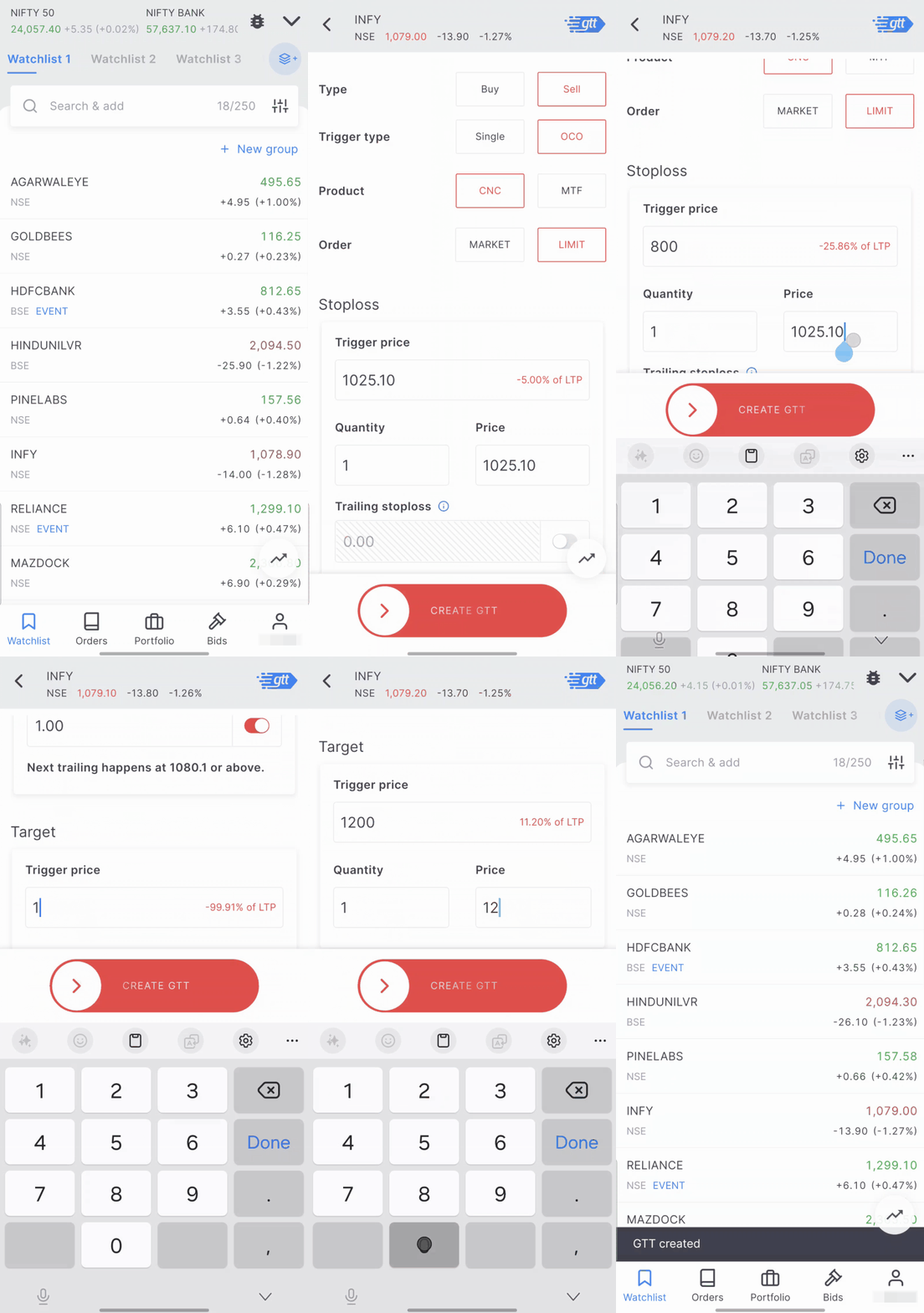
On Kite app
- On Marketwatch, Holdings, or Positions, tap the instrument you want to place a GTT for, then tap Create GTT.
- Choose Buy or Sell as the transaction type.
- Select Single or OCO as the trigger type. OCO (One Cancels the Other) lets you set both a stoploss and a target in the same GTT. TSL is available with both Single and OCO orders.
- Select a Limit or Market order. If you select Market, an order with market protection will be placed when the GTT is triggered.
- In the Stoploss section, enter the quantity, trigger price, and limit price.
- Enable the Trailing toggle and enter the trailing point. Once enabled, Kite shows the price at which the next adjustment will happen.
- Swipe on Create GTT to place the order.
On Kite web
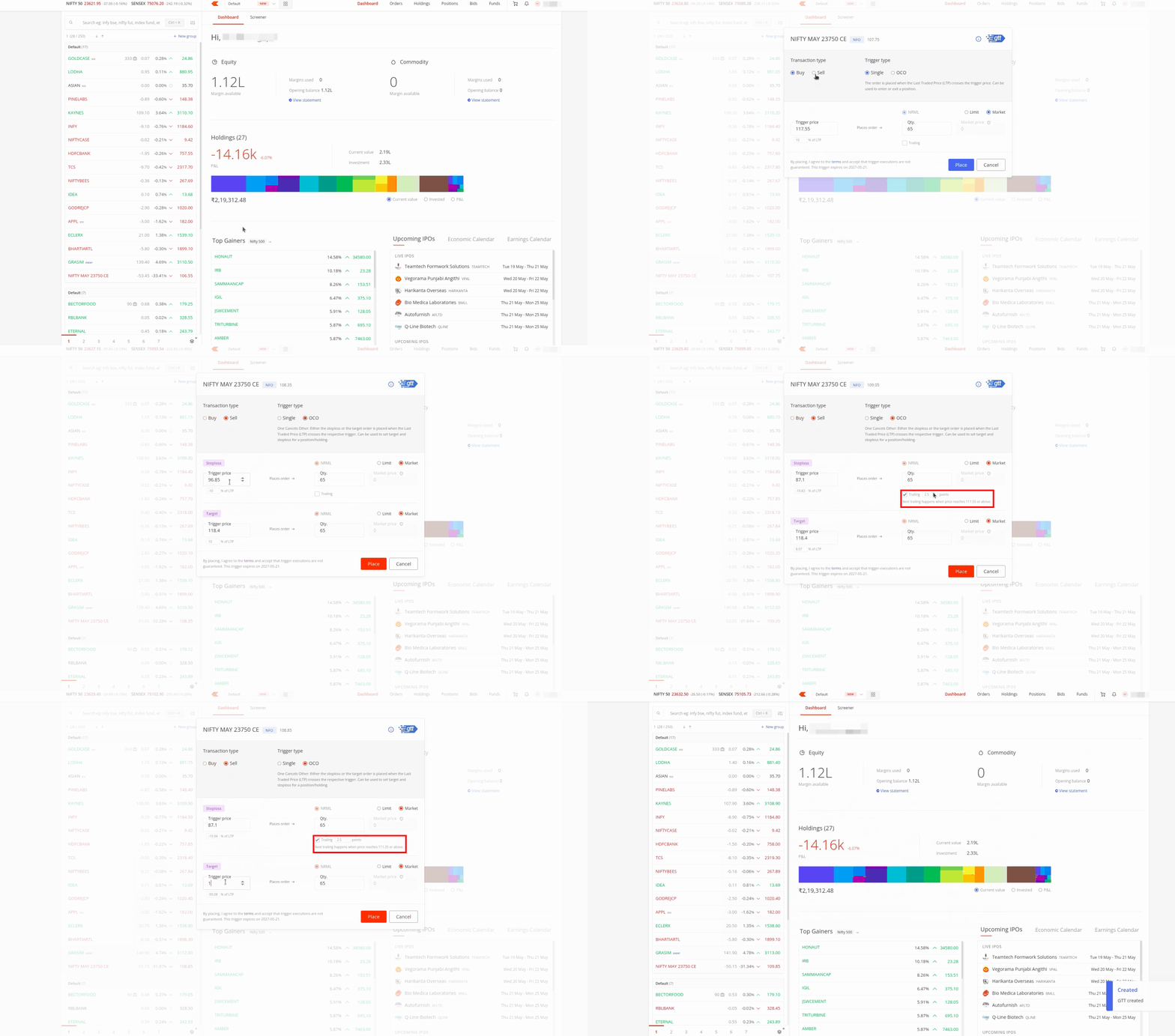
- Go to your marketwatch or your holdings and hover over the stock or contract you want.
- Click on the three dots and select Create GTT.
- Select Buy or Sell under the transaction type at the top left.
- Select Single or OCO under the trigger type at the top right. OCO (One Cancels the Other) lets you set both a stoploss and a target in the same GTT. TSL is available on both Single and OCO orders.
- In the Stoploss section, enable the trailing checkbox and enter your trailing point value in the field next to it.
- Set the order type to Limit or Market. If you select Market, your order will be executed with market protection.
- Enter your quantity in the Qty field.
- Click on Place to submit the GTT.
Viewing your GTT details
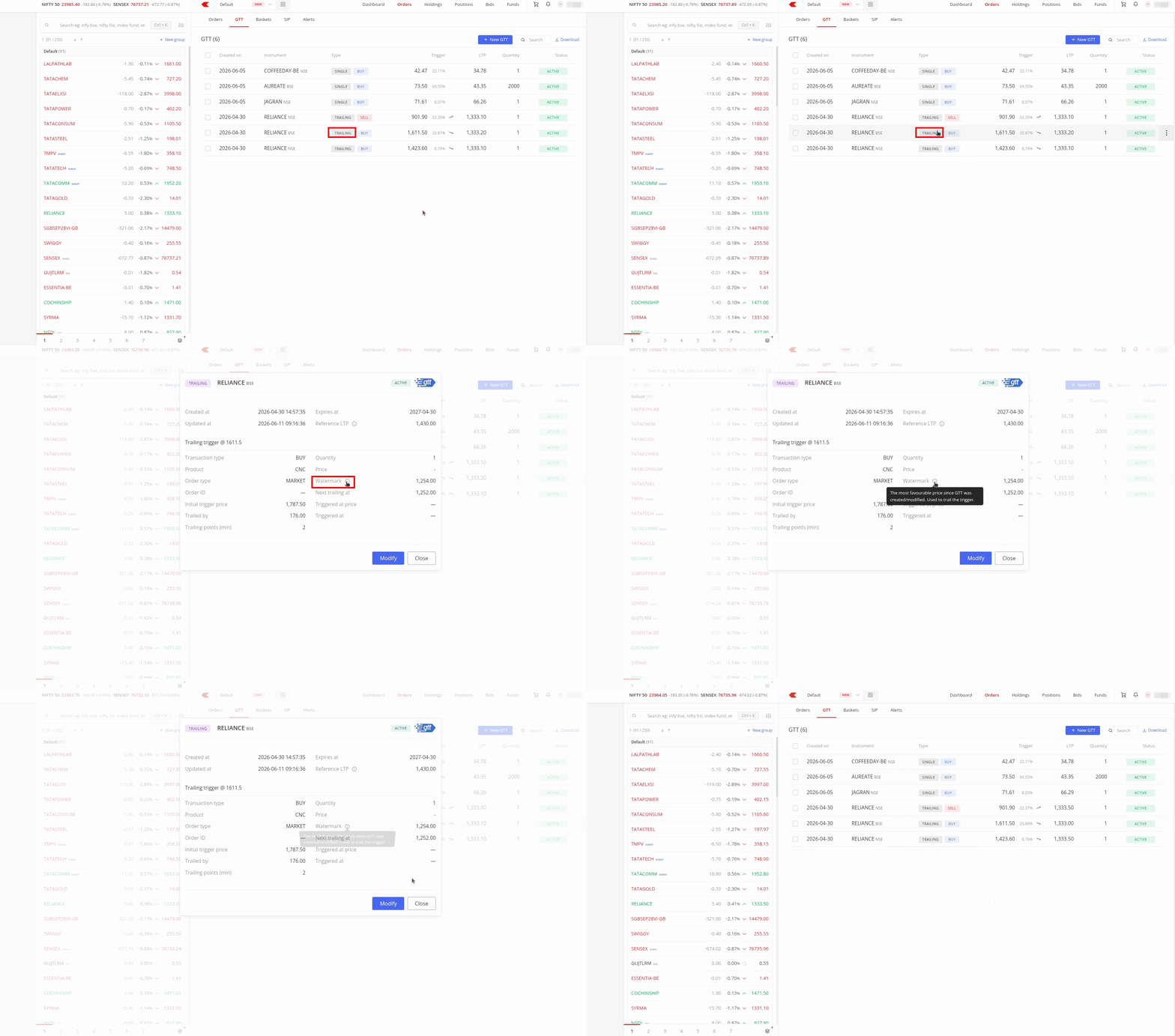
You can view a GTT's details by clicking on its status or through the Info option in the three dot menu. This shows all order details along with a watermark price.
The watermark price is the most favourable price the stock has reached since you created or last modified the GTT. Kite uses it to track how far the price has moved and determine when the next trailing adjustment should happen.
- For a buy GTT, the watermark price is the lowest price the stock has reached.
- For a sell GTT, the watermark price is the highest price the stock has reached.
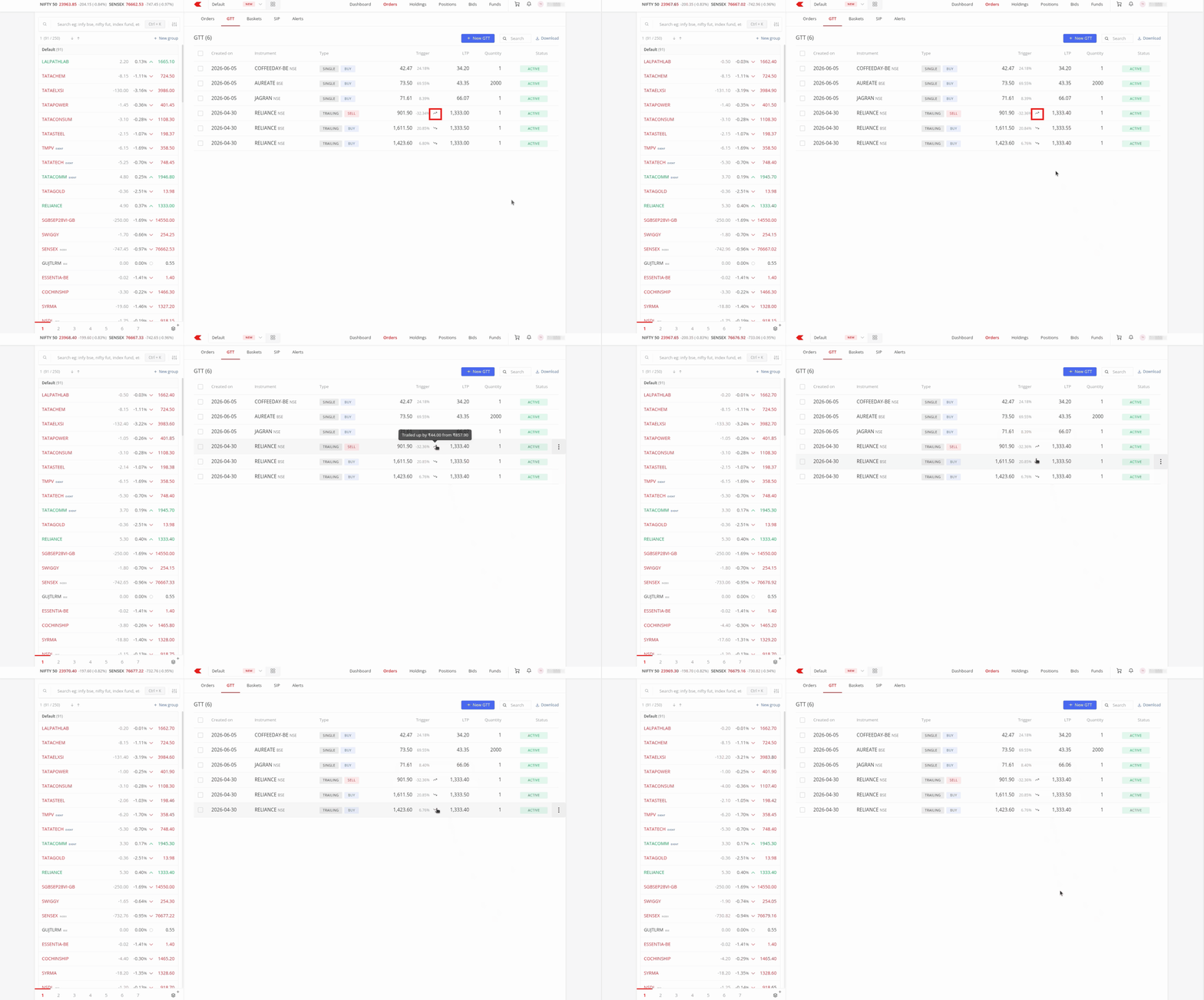
Once your GTT order trails, a Trailed tag appears on the order. You can hover over the up and down arrows to see how much it has trailed from the initial trigger price.
Examples
Sell trailing stoploss
- You set a trailing stoploss at ₹90 on a stock trading at ₹100. The trailing point is ₹1, so the gap is ₹10.
- The price rises to ₹105. Your stoploss moves up to ₹95 to maintain the ₹10 gap.
- The price rises further to ₹130. Your stoploss moves up to ₹120.
- The price falls to ₹125. Your stoploss stays at ₹120 and does not move down.
Buy trailing stoploss
- You set a trailing stoploss at ₹110 on a stock trading at ₹100. The trailing point is ₹1, so the gap is ₹10.
- The price drops to ₹95. Your stoploss moves down to ₹105 to maintain the ₹10 gap.
- The price drops further to ₹70. Your stoploss moves down to ₹80.
- The price rises to ₹75. Your stoploss stays at ₹80 and does not move up.
Minimum trailing point values
The minimum trailing point depends on the instrument price and segment.
For stocks (NSE and BSE) and Futures:
| Price range (₹) | Minimum trailing point |
|---|---|
| 0 to 50 | 0.05 |
| 50 to 100 | 0.10 |
| 100 to 250 | 0.25 |
| 250 to 500 | 0.50 |
| 500 to 1,000 | 1 |
| 1,000 to 2,500 | 2 |
| 2,500 to 10,000 | 5 |
| 10,000 to 20,000 | 25 |
| 20,000 and above | 50 |
For Options:
| Price range (₹) | Minimum trailing point |
|---|---|
| 0 to 50 | 1 |
| 50 to 100 | 2.5 |
| 100 to 500 | 5 |
| 500 and above | 10 |
The trailing point slab is determined based on the LTP and the trigger price whichever is lower. For example, in a sell option contract, if the LTP is 101 and the trigger price is 95, the minimum trailing point can be 2.5, as the trigger price is lower and falls within the 50 to 100 slab. Similarly, in a buy option contract, if the LTP is 99 and the trigger price is 101, the minimum trailing point can also be 2.5, as the LTP is lower and falls within the 50 to 100 slab.
Segment rules and behaviour
Supported segments and products
- Equity segment: TSL is available only on the sell side, on both Single and OCO orders.
- NFO (NSE Futures and Options) segment: TSL is available on both the buy and sell sides.
- Supported exchanges: NSE (National Stock Exchange), BSE (Bombay Stock Exchange), NFO, BFO (BSE Futures and Options), and MCX (Multi Commodity Exchange).
- Supported product types: CNC (Cash and Carry), MTF (Margin Trading Facility), and NRML (Normal).
How trailing adjustments work
- When a trailing adjustment happens, Kite updates both the stoploss trigger price and the limit price simultaneously by the same trailing point value.
- If you modify the trigger price of a GTT after placing it, the reference price resets to the LTP (Last Traded Price) at the time of your change, and trailing continues from that new anchor.
-
The trailing points can be modified based on their respective slabs. the lower of the LTP or Trigger Price is considered for determining the trailing point, irrespective of whether it is a buy or sell order.