


Your limit order executed at a better price because the exchange's matching engine automatically gives you the best available price. When you place a buy limit order, your order executes at your limit price or lower. When you place a sell limit order, your order executes at your limit price or higher.
Example scenario
Consider SBIN trading at ₹185.40, with the best bid at ₹185.35 and best offer at ₹185.40.
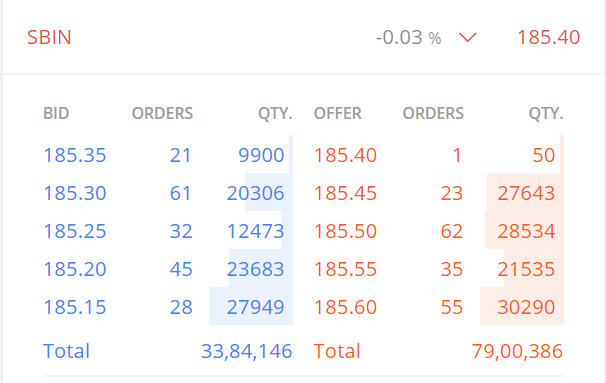
- Buy limit order: When you place a limit buy order at ₹190 and a seller offers shares at ₹185.40, you'll purchase at ₹185.40, saving ₹4.60.
- Sell limit order: When you place a limit sell order at ₹180 and a buyer bids ₹185.35, your order executes at ₹185.35, earning you ₹5.35 more.
What if you want to buy only at ₹190 or sell only at ₹180?
You can use trigger orders to execute trades at specific prices. Trigger orders don't place your order directly on the exchange. Instead, you set a trigger price, and when the stock reaches that price, the system places your order.
Zerodha offers two trigger order types:
- Good Till Triggered (GTT) orders remain valid for up to one year.
- Stoploss orders remain valid only for the trading day.
To buy stock at exactly ₹190, you can set a GTT or SL order with either:
- A limit order with ₹190 trigger to buy at ₹190
- A market order with a ₹190 trigger to buy at the prevailing market price
Similarly, you can place a sell order with a ₹180 trigger to sell when the stock reaches that level.