


You can watch this video in Hindi here.
SEBI has introduced a new way to calculate the closing price of a stock, called the Closing Auction Session (CAS), which becomes effective from August 3, 2026. This replaces the previous calculation process. In Phase 1, CAS applies only to stocks in the Futures & Options (F&O) segment.
Exchanges use the closing price for:
- Calculating indices like the Nifty 50 and BSE Sensex
- Determining the Net Asset Value (NAV) of mutual funds
- Settling F&O positions on expiry
- Showing your portfolio value and profit and loss (P&L)
- Valuing stocks when you pledge them as collateral, etc.
You can track the Closing Auction Session (CAS) at zerodha.com/cas. You can view reference price, indicative close, and imbalance for eligible stocks during the CAS (3:15 - 3:35 PM on trading days).
The closing price is not the last traded price. Exchanges use Volume Weighted Average Price (VWAP), calculated from trades in the last 30 minutes of the trading session. This is because the last traded price can be misleading. If a stock trades between ₹1,000 and ₹1,010 all day and a small trade happens at ₹980 near the close, that one trade should not define the closing price. VWAP gives more weight to trades with higher volume, so a small trade does not distort the price.
What is changing and why?
SEBI has introduced the Closing Auction Session (CAS). Instead of looking at trades over the last 30 minutes, CAS collects all buy and sell orders at the end of the day into a single pool and determines one price where the maximum number of shares can be traded. This becomes the closing price. Most global markets, including the New York Stock Exchange (NYSE) and the London Stock Exchange (LSE), already use this method.
CAS improves price discovery: the closing price reflects where buyers and sellers actually agree, it becomes harder to influence prices with last-minute trades, large orders can be executed more efficiently, and it reduces tracking error for index funds and ETFs.
In Phase 1, CAS applies only to F&O stocks. All other stocks continue as they do today.
How does the auction work?
For F&O stocks, continuous trading stops at 3:15 PM from August 3, 2026. Here is how the last 30 minutes work:
- 3:00 to 3:15 PM: Regular trading
Regular trading continues normally. The exchange simultaneously calculates VWAP for these 15 minutes, which becomes the reference price for the auction.
- 3:15 to 3:20 PM: Transition period
Trading stops for F&O stocks. Zerodha collects orders placed between 3:15 PM and 3:20 PM as After Market Orders (AMO) and sends them to the exchange at 3:20 PM. F&O contracts on these stocks continue to trade normally until 3:40 PM. The exchange carries forward existing open orders, except for stop loss orders, iceberg orders, and orders outside the 3% band on either side of the reference price.
- 3:20 to 3:25 PM: Order Entry Session I
You can place, modify, or cancel both market and limit orders. The exchange shares an indicative price (where the market is likely to settle), total buy and sell quantities, and order imbalance (whether there are more buyers or sellers).
- 3:25 to 3:30 PM: Order Entry Session II
You can only place, modify, or cancel limit orders. Market orders cannot be placed, modified, or cancelled. This session closes at random between 3:28 PM and 3:30 PM to avoid last-minute order flooding. Once it closes, the exchange matches all orders at the price where the maximum number of trades can happen. That becomes the official closing price.
- 3:30 to 3:35 PM: Order Matching & Confirmation Period III
Order matching, trade confirmation and Closing price determination. The order matching period starts immediately after the completion of the order entry session. Matching is done at the equilibrium price. Market orders are matched first, followed by residual market orders against limit orders, and then limit orders based on time priority
How does the exchange determine the closing price?
A buyer willing to pay ₹1,010 will also accept ₹1,005 or ₹1,000, as they will take any price equal to or lower than their limit. A seller willing to sell at ₹1,000 will also sell at ₹1,005 or higher. The exchange uses this logic to calculate executable volume at each price level and picks the price where the most shares can be matched.
| Price | Executable volume |
| ₹1,000 | 200 shares |
| ₹1,002 | 500 shares |
| ₹1,005 | 900 shares |
| ₹1,008 | 800 shares |
| ₹1,010 | 500 shares |
In this example, ₹1,005 has the highest executable volume of 900 shares, so it becomes the closing price.
Good Till Triggered (GTT) and Kite alerts
The implementation of the Closing Auction Session (CAS) modifies when your long-standing GTT orders and price alerts can trigger. The new trigger timings are:
- F&O stocks: GTT orders and price alerts can trigger until 3:15 PM.
- Non-F&O stocks: GTT orders and price alerts can trigger until 3:30 PM, which is the standard market close timing.
- F&O contracts: GTT orders and price alerts can trigger until 3:40 PM, which is the derivatives segment close timing.
Intraday square-off timings
Since continuous trading for CAS stocks ends at 3:15 PM, Zerodha adjusts the intraday (MIS and CO) auto-square-off timings for these securities. This ensures you can exit your positions before regular trading halts. The square off timings are:
- F&O stocks: Zerodha will auto-square off your open intraday positions by 3:12 PM. You must plan and exit your trades before this cutoff to avoid auto square-off charges.
- Non-F&O stocks: Zerodha does not change the auto square-off timings for non-F&O stocks. Standard equity auto square-off remains at 3:25 PM as usual.
- F&O contracts: Zerodha does not change the auto square-off timings for F&O contracts. Standard F&O auto square-off remains at 3:26 PM as usual.
Tracking the closing auction on Kite
You can view key data points in the market depth on Kite web during the Closing Auction Session (CAS) window to track the auction:
- Reference price: This represents the Volume Weighted Average Price (VWAP) between 3:00 PM and 3:15 PM. The exchange conducts the closing auction around this reference price.
- Indicative close: This represents the price where the exchange can currently match the maximum quantity of buy and sell orders. This tells you where the stock may close if the auction ends at that point.
- Total imbalance quantity: This tells you the remaining buy or sell quantity that the exchange cannot match at the current indicative equilibrium price.
For indices, you can also see the indicative close. This provides you with an estimate of where the index may close based on its constituent stocks.
You can view these data points in the Kite app soon.
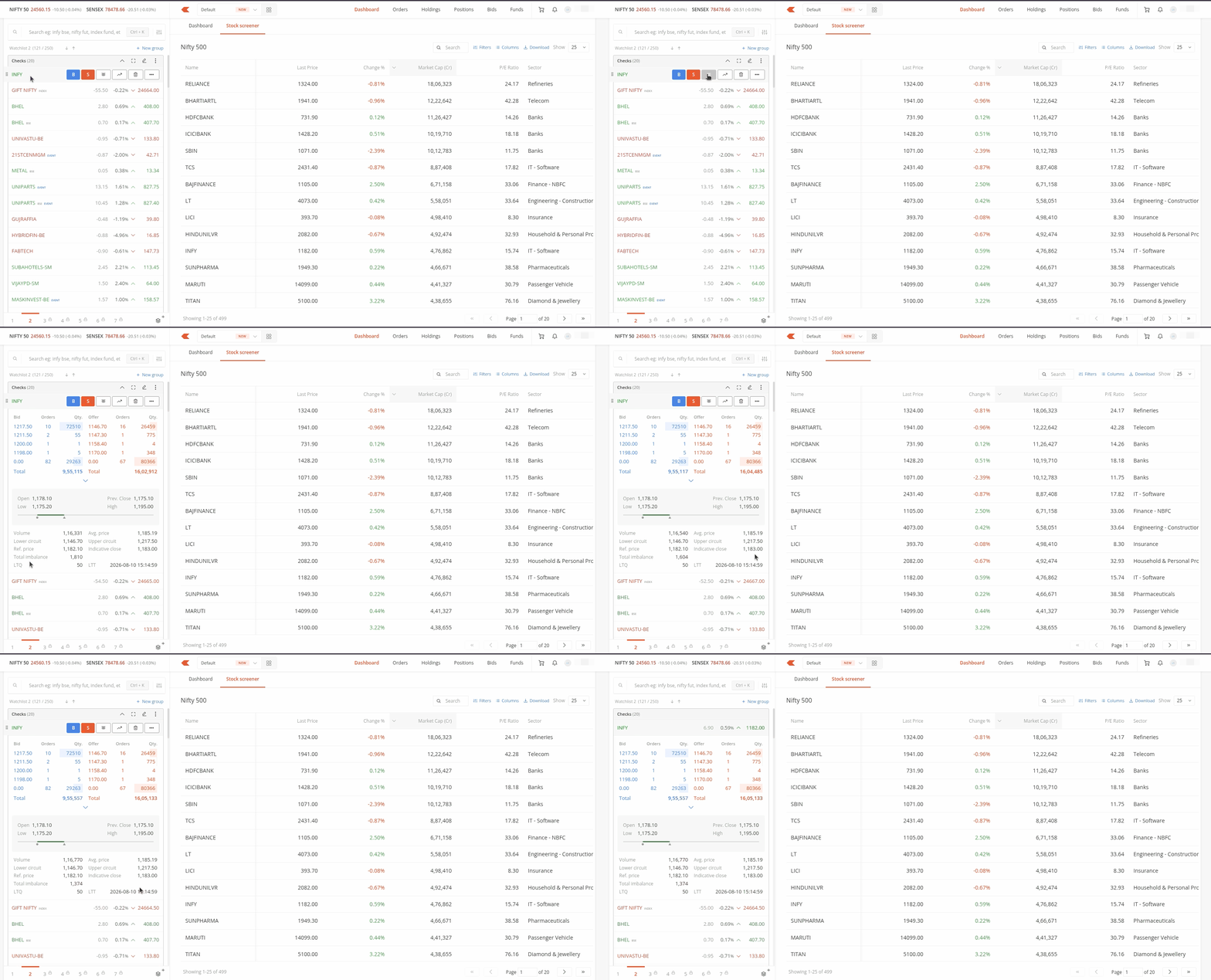
Things to keep in mind:
- NSE stocks: You can view the indicative close for non-CAS stocks starting with the first trade after 3:00 PM. The reference price and imbalance quantity do not apply to non-CAS stocks. For CAS stocks, you can view the reference price, indicative close, and imbalance quantity starting from 3:20 PM.
- BSE stocks: You can view these metrics only for CAS stocks starting from 3:20 PM. These metrics do not apply to non-CAS stocks.
- Futures contracts: You can view only the reference price and indicative close. The imbalance quantity does not apply because trading continues throughout the session.
- Indices: You can view only the indicative close. The exchange calculates this based on the index's constituent stocks.