


You can open a secondary demat account for free, entirely online through Zerodha, if your Aadhaar is linked to your mobile number. A secondary demat account gives you an additional demat account alongside your existing primary account, helping you separate long-term investments from short-term trades and improve tax planning through better FIFO management.
Table of contents
- Advantages of a secondary demat account
- How to open a secondary demat account
- How to transfer shares between accounts
- Charges of a secondary demat account
- FAQs
Advantages of a secondary demat account
- Efficient tax handling through separate FIFO calculation: As per the ITD circular, First In First Out (FIFO) method shall be followed when you have more than one security in your demat account. You can transfer your long-term holdings to a secondary demat account to ensure your short-term trades aren't affected by FIFO rules during tax filing. FIFO will be applied separately for each demat.

Example scenario: Let's say you are investing in ABC Ltd with both long-term and short-term strategies.
Timeline:
- January 2024: Buy 100 shares of ABC at ₹100 each (long-term investment)
- June 2024: Stock price rises to ₹150. You want to do some short-term trading
- June 2024: Buy another 100 shares at ₹150 for quick profit
- July 2024: Stock hits ₹180, you decide to sell 100 shares
Without secondary demat account:
- Under FIFO rules, you must sell the oldest shares first
- You'd sell the January batch (bought at ₹100)
- Profit = ₹180 - ₹100 = ₹80 per share
- Total profit = ₹8,000
- Problem: Your long-term holdings are gone, and you pay short-term capital gains tax on ₹8,000
With secondary demat account:
- Transfer your January long-term holdings (100 shares at ₹100) to secondary account
- Keep June short-term holdings (100 shares at ₹150) in primary account
- When you sell in July, FIFO applies only to your primary account
- You sell the June batch (bought at ₹150)
- Profit = ₹180 - ₹150 = ₹30 per share
- Total profit = ₹3,000
Your long-term investment remains intact in the secondary account, and you pay tax only on ₹3,000
- Portfolio organisation: Since shares in your secondary demat account will not appear on Kite and can only be viewed on Console, this helps you keep long-term and short-term investments separate, maintaining investment discipline.
- Prevents impulsive selling: Since shares can only be sold from your primary account, and it takes 24 hours for shares to be transferred from secondary to primary, you cannot instantly sell your long-term holdings when the market falls. This transfer time helps you avoid panic selling and gives you time to think through decisions, making more informed choices instead of acting on emotions.
How to open a secondary demat account
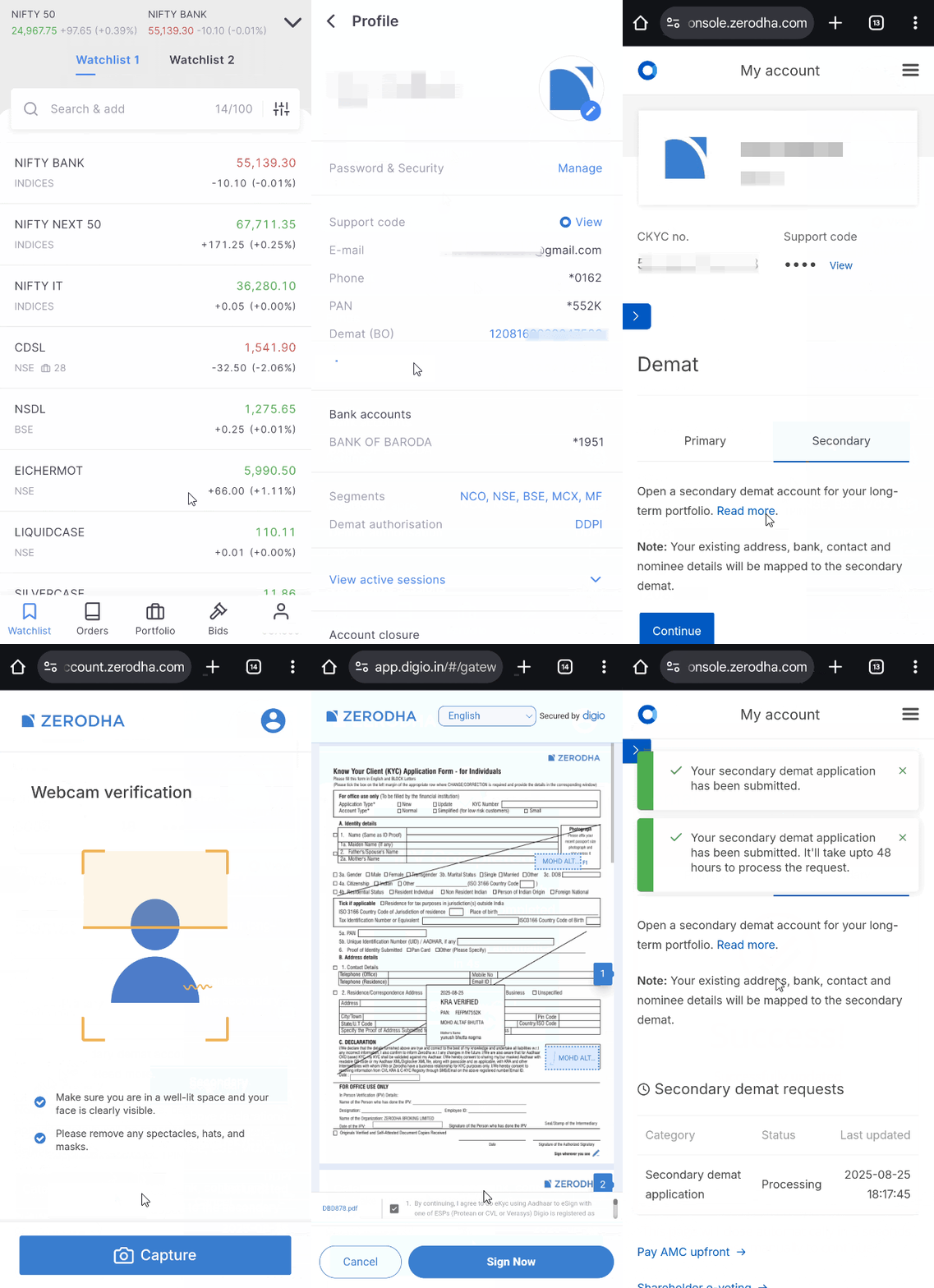
Kite app
- Tap on your user ID.
- Tap on Profile and then on Manage account.
- Tap on the arrow and then on Demat.
- Tap on secondary and then on Continue.
- Enter nominee details.
- Confirm the undertaking and tap on Continue.
- Complete the In-Person Verification (IPV) by tapping on Capture. Ensure that your face is clearly visible.
- Tap on Sign Now.
- Enter your Aadhaar number, tick the undertaking and click on Get OTP.
- Enter the OTP you received and click on Verify OTP.
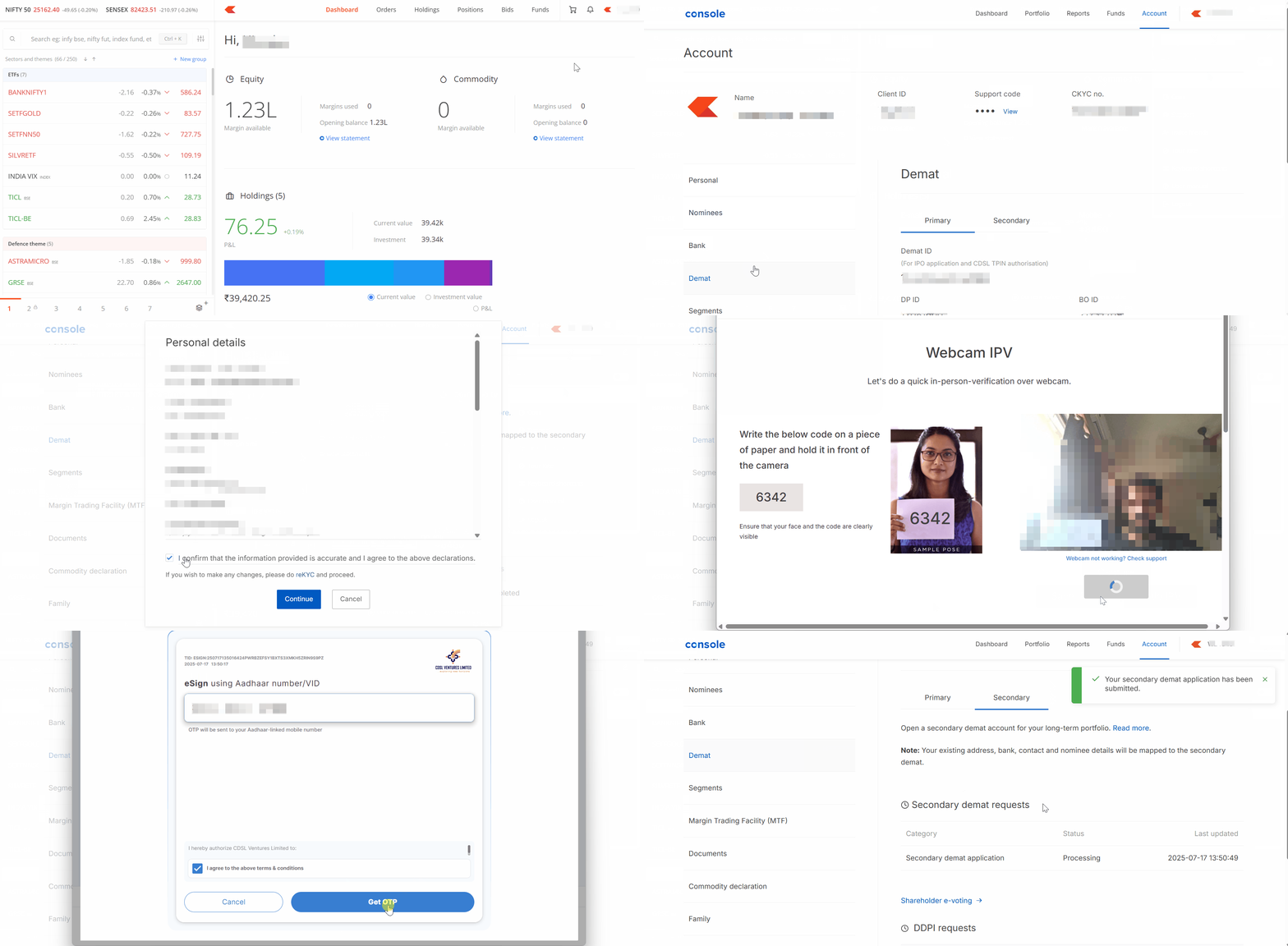
Kite web
- Log in to Kite.
- Click on your user ID and then on Console.
- Click on Account and then on Demat.
- Click on Secondary and then on Continue.
- Enter nominee details.
- Confirm the undertaking and click on Continue.
- Complete the In-Person Verification (IPV).
- Click on Sign Now.
- Enter your Aadhaar number, tick the undertaking and click on Get OTP.
- Enter the OTP you received and click on Verify OTP.
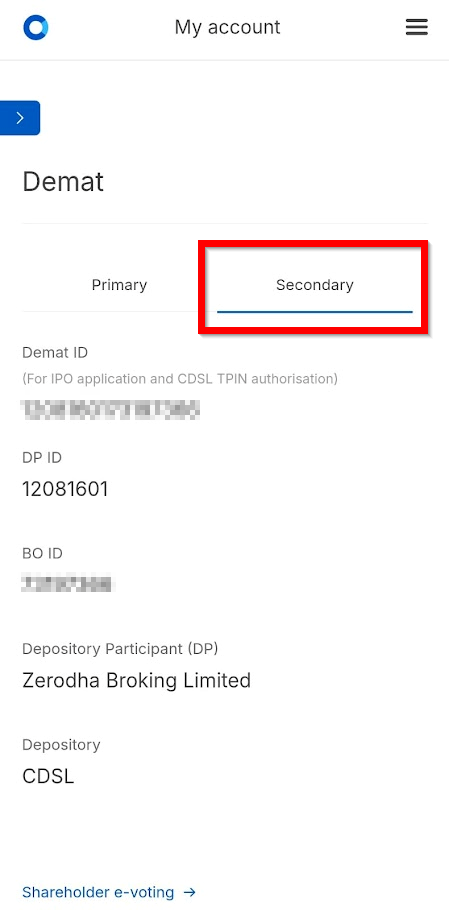
Your secondary demat account will be opened within 72 working hours. You will receive an email confirmation from Zerodha and see the account listed in Console under the Demat section.
Once your secondary account is activated, you will receive the TPIN for your secondary demat account via email. You can also generate the TPIN by entering the BO ID for your secondary account. TPIN will be different for your primary and secondary demat accounts.
How to transfer shares between accounts
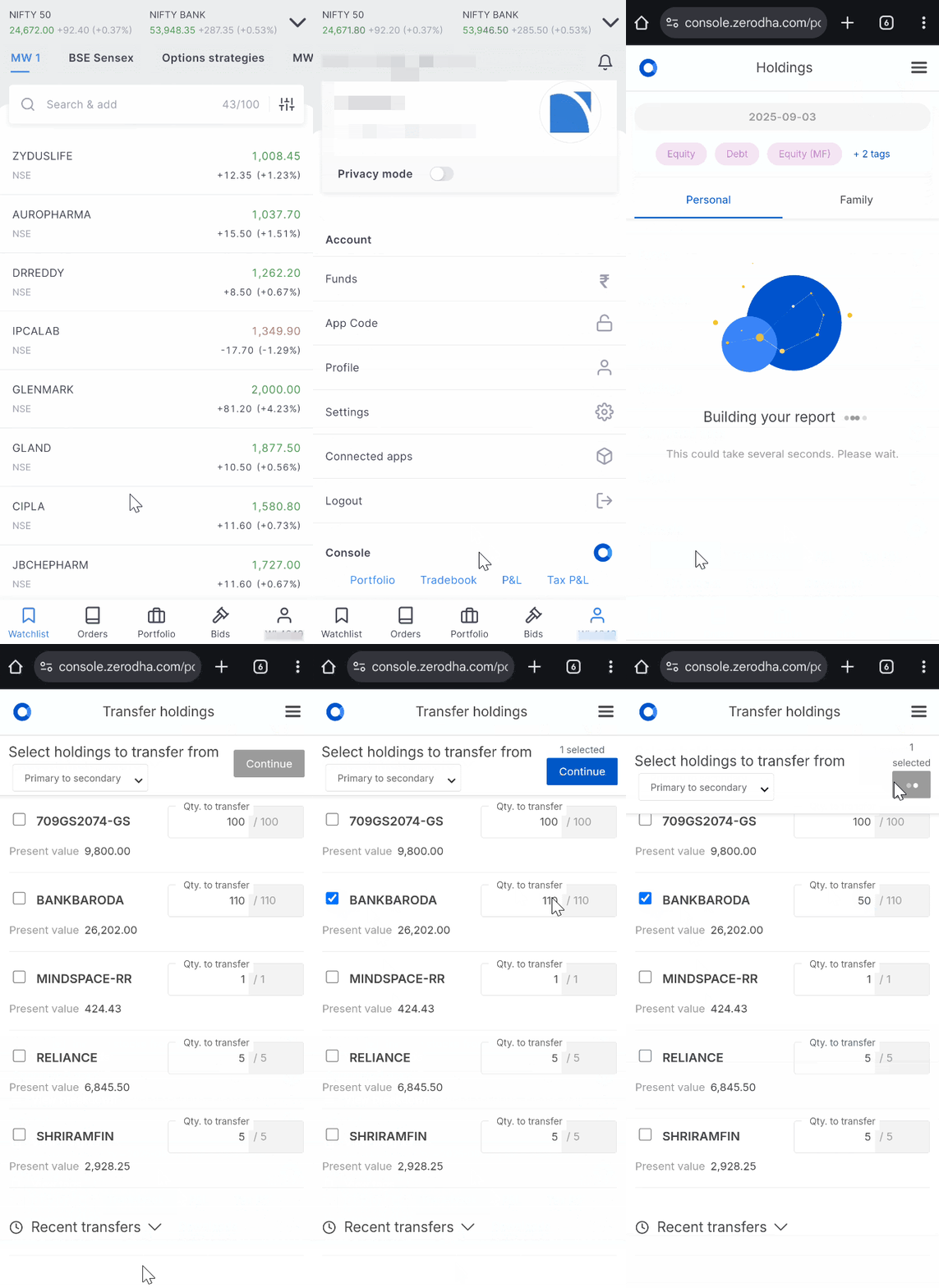
- Tap on your user ID.
- Tap on Portfolio.
- Scroll down and tap on the stock you want to transfer.
- Tap on Transfer to secondary demat account.
- Select the stock, enter the quantity to transfer and tap on Continue.
- Authorise the debit of stocks by entering the CDSL TPIN and OTP.
Add beneficiary: If your secondary demat account is already added as a beneficiary, skip this step. If adding a new beneficiary, CDSL will send you a verification email between 3 PM and 5 PM on trading days:
- Click on the link in the email.
- Enter your PAN or primary demat account number (16-digit ID).
- Click on Submit.
- Tick the beneficiary details and click on Generate OTP.
- Enter the OTP and click on Accept.
- Click on OK.
Confirm the transfer: If you authorise the transfer using TPIN before 2 PM, CDSL will send a verification email and SMS by 5 PM on the same trading day. If authorised after 2 PM, it will be sent on the next trading day. Once received, complete the OTP verification using your PAN or 16-digit demat account ID before 8 PM. Missing this deadline will require you to restart the entire transfer process.
Your securities will appear in the secondary demat account within 24 hours after successful verification. You can follow the same steps to transfer securities from a secondary to a primary demat account. The buy average gets automatically updated within 3 working days for stocks transferred between primary and secondary demat accounts, so you don’t need to update it manually.
Charges of a secondary demat account
Account Maintenance Charges (AMC): ₹300 + 18% GST for each account separately
- ₹300 + 18% GST for your primary account
- ₹300 + 18% GST for your secondary account
Your account will not qualify as a BSDA (Basic Services Demat Account) as the criteria for BSDA require you to have only one demat account. For example, even if your primary account has holdings worth ₹20,000 and your secondary account has holdings worth ₹40,000 (both under the ₹4 lakh BSDA limit individually), you will still pay regular AMC charges for both accounts instead of the reduced BSDA charges.
Off-market transfer charges: ₹13 + 18% GST = ₹15.34 per transfer transaction between your primary and secondary demat accounts.
Example scenario: Let's say you transfer 100 shares of XYZ company from your primary to secondary account in January, and later transfer 50 shares of the same XYZ company from secondary back to primary account in February. You will pay ₹15.34 for each transfer, totalling ₹30.68 for these two transactions. These charges are applied per transfer transaction, regardless of the number of shares or stock value being transferred.
FAQs
1. What is a secondary demat account?
A secondary demat account is an additional demat account that you can open alongside your existing (primary) demat account through Zerodha Console. It works like a separate holding space where you can keep securities that you do not intend to sell or keep for a long time. It also helps with tax efficiency through better FIFO management.
2. Can I move shares between my primary and secondary accounts?
Yes, you can easily transfer shares between accounts online through Console. The buy average gets automatically updated within 3 working days for stocks transferred between primary and secondary demat accounts, so you don’t need to update it manually.
3. Will my secondary demat holdings appear on Kite?
No, shares in your secondary account will not appear on Kite. You can view them only on Console. This helps maintain discipline by keeping long-term investments separately from your active trading interface.
4. Will secondary demat transfers appear in my Tax P&L report?
No, secondary demat transfers will not appear in your Tax P&L report since a secondary demat account only holds shares (no buying or selling happens there). When you transfer shares back to your primary account and sell them, those sale transactions will be included in your Tax P&L report.
5. What are the charges for a secondary demat account?
Account Maintenance Charges (AMC): ₹300 + 18% GST for each account separately
- ₹300 + 18% GST for your primary account
- ₹300 + 18% GST for your secondary account
Your account will not qualify as a BSDA (Basic Services Demat Account) as the criteria for BSDA require you to have only one demat account. For example, even if your primary account has holdings worth ₹20,000 and your secondary account has holdings worth ₹40,000 (both under the ₹4 lakh BSDA limit individually), you will still pay regular AMC charges for both accounts instead of the reduced BSDA charges.
Off-market transfer charges: ₹13 + 18% GST = ₹15.34 per transfer transaction between your primary and secondary demat accounts.
Example scenario: Let's say you transfer 100 shares of XYZ company from your primary to secondary account in January, and later transfer 50 shares of the same XYZ company from secondary back to primary account in February. You will pay ₹15.34 for each transfer, totalling ₹30.68 for these two transactions. These charges are applied per transfer transaction, regardless of the number of shares or stock value being transferred.
6. Who can open a secondary demat account?
Only resident individual accounts can open a secondary demat account. You cannot open one if you have an NRI account, a minor account, or a non-individual account (joint, corporate, partnership, or HUF account).
7. Can I sell shares directly from my secondary account?
No, you cannot sell shares directly from your secondary account. To sell shares from your secondary account, you must first transfer them to your primary account, which takes 24 hours, then sell from Kite.
8. Can I convert my secondary demat account to a primary demat account?
No, it's not possible to convert a secondary demat account into a primary one, or vice versa.
However, moving shares between your accounts is straightforward. You can easily transfer shares between accounts online through Console. Console automatically updates buy averages and applies FIFO calculations when you make transfers.
9. What happens during corporate actions like bonuses and splits?
Corporate actions are processed in the same demat account where your shares are held. If your shares are in your primary demat account, the bonus shares or split shares will be credited to your primary account. If your shares are in your secondary account, the corporate actions will be processed in your secondary demat account.
10. What's the advantage of having a secondary demat account with Zerodha over having accounts with different brokers?
Having a secondary demat account with Zerodha has these advantages over using different brokers:
- Tax filing: All your trades are in one place, making it easy to file taxes with Zerodha's superior Tax P&L reports.
- Prevents panic selling: When markets crash, you might want to quickly sell your long-term investments out of fear. With different brokers, you can sell your investments instantly from each account. But with Zerodha's secondary account, you need to transfer shares first, which takes one day. This waiting time helps you calm down and stick to your long-term plan.
- Easy management: You use one login for all accounts and see everything in one place, instead of managing multiple logins with different brokers.
11. Can I use shares in my secondary account as collateral for trading?
No, you cannot use shares in your secondary account as collateral for trading or pledge them for margins.
12. What is the TPIN for my secondary account?
Once your secondary account is activated, you will receive the TPIN via email. You can also generate the TPIN by entering the BO ID for your secondary account. TPIN will be different for your primary and secondary demat accounts.
13. Do transfers between primary and secondary accounts attract capital gains?
No, transferring shares between your primary and secondary demat accounts does not attract capital gains. These are considered off-market transfers and are not taxable events.
14. Can I transfer mutual funds between my primary and secondary demat accounts?
Currently, you cannot transfer mutual funds between accounts. This feature will be available soon.
15. Can I pledge holdings from my secondary demat account?
No, you cannot pledge holdings or lend securities through Securities Lending and Borrowing (SLB) from your secondary demat account. To do either of these, you will need to transfer the shares to your primary demat account first.
16. Will holdings in the secondary demat account be eligible for corporate actions such as buybacks, takeovers, and delistings?
Yes. Holdings in the secondary demat account are eligible for corporate actions such as buybacks, takeovers, and delistings.
However, if you wish to apply for these corporate actions through Console, you must transfer the shares from the secondary demat account to the primary demat account before the record date.
If you do not want to transfer the shares, you will need to update the beneficiary account details in the company's records by contacting the respective Registrar and Transfer Agent (RTA). This will allow you to participate in the corporate action using your secondary demat holdings.
17. Can I close my secondary demat account online?
Yes, a secondary demat account can be closed either
- Online by submitting an e-signed account closure form (PDF) through a support ticket.
- Offline by following the offline account closure process.
18. Is AMC free for the first year on a secondary demat account?
AMC is free for the first year for all resident individual accounts opened on or after 1 June 2026. However, this waiver does not apply to a secondary demat account. If you open a secondary demat account, AMC charges of ₹300 + 18% GST will apply to it from day one, including the first year.