


You must cancel any active SIPs in the scheme before transferring mutual fund units to Zerodha. Once you transfer the units, you can create an SIP on Coin.
The transfer process depends on how you hold your units:
Units held in demat mode
CDSL account
You can follow the transfer process mentioned in How to transfer shares from the other broker to Zerodha?
NSDL account
Submit the following documents to your NSDL DP (the other broker):
- Obtain a Delivery Instruction Slip (DIS) from the other broker
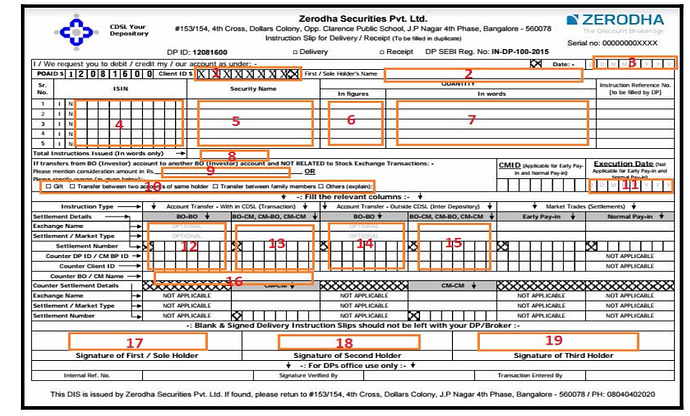
- On the DIS, mention the number of units and the Zerodha demat account number. For the demat account number, visit console.zerodha.com/account/demat.
- Submit the DIS to the other broker.
Example of DIS
Units held in physical mode or in Statement of Account (SOA)
The mutual fund units must be dematerialised or destatementized.
Units under lock-in period
The only way you can transfer ELSS mutual funds under lock-in from one demat to another is via closure cum transfer process. You can only move the locked-in units to another demat account of the same account holder. If your ELSS scheme is out of the lock-in period or has free units, you can transfer it without any restrictions.
Processing time: After you submit all documents, the transfer takes up to 4 days to complete.
Things to keep in mind
- Your mutual fund holdings will reflect as discrepant after you transfer them to Zerodha.You should manually enter the buy average for such units.
- If you hold regular mutual funds in demat or physical form, you should exit those funds and repurchase them on Coin. Transferring regular mutual funds to Zerodha will not convert them to direct mutual funds.
- If the other broker asks for it, you can get your CMR copy from Console.