


Individuals and non-individuals (companies, partnerships, LLPs, and HUFs) can change their email address and Indian mobile number online. For HUF accounts, the Karta can complete the e-Sign. For other non-individual accounts, the eSign can be completed by an authorised signatory using their individual Aadhaar number.
The online modification can be completed only if the non-individual account has a designated single authorised signatory or a jointly/severally authorised signatory. If you hold a joint account, use an international mobile number, if your mobile number is not linked with Aadhaar, or if you are a non-individual account with jointly authorised signatories, you must update your contact details offline.
Table of contents
Indian mobile number and email
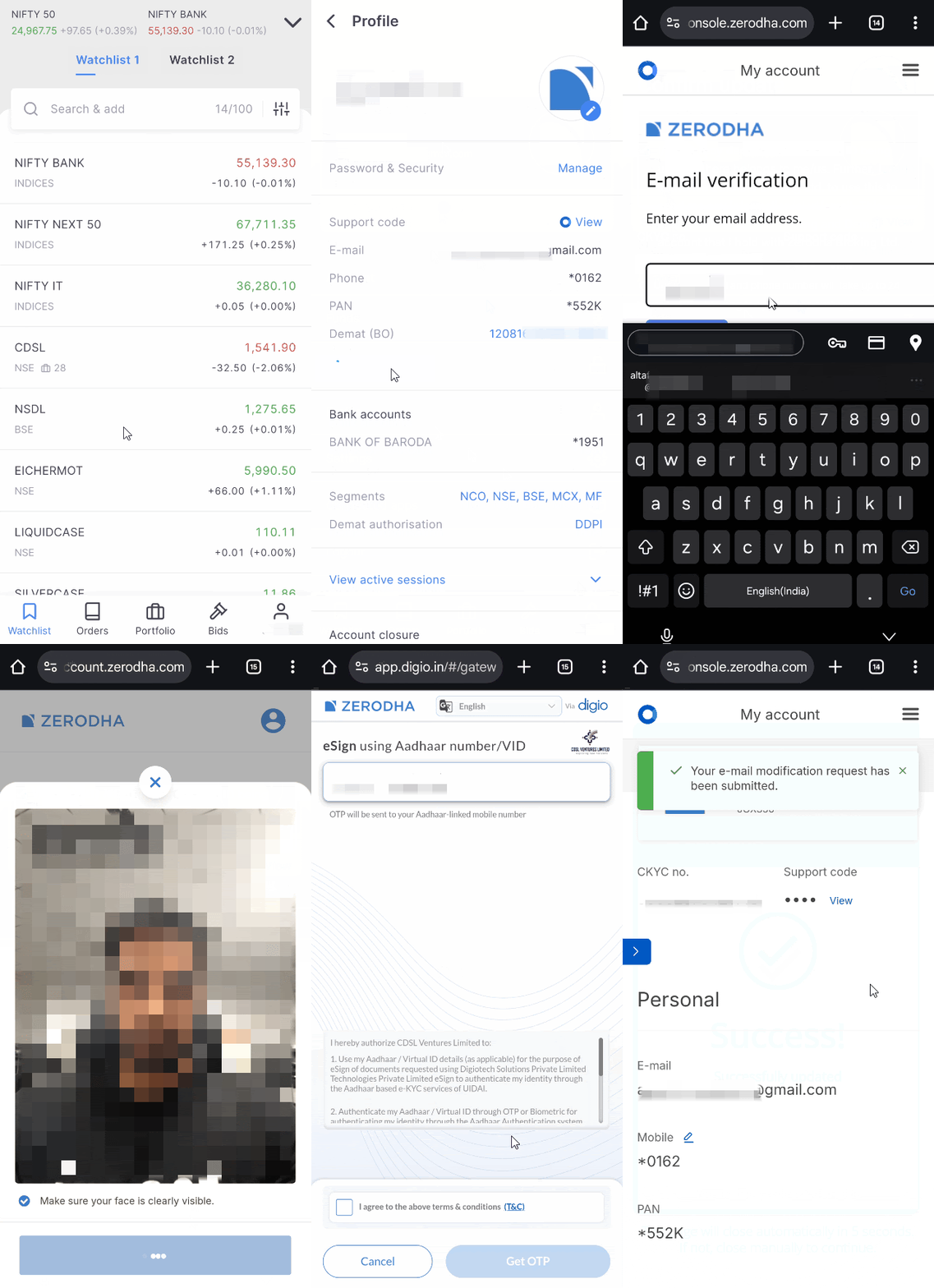
To update the contact details, follow these steps:
Kite app
- Tap on your user ID.
- Tap on Profile.
- Tap on Manage account.
- Tap on the pencil icon beside E-mail or Mobile.
- Tick the checkbox and tap on Continue.
- Enter your updated mobile or email and tap on Continue .
-
Enter the OTP and tap on
Verify.
- Complete the In-Person Verification (IPV) by clicking on Capture. Ensure that your face is clearly visible.
- Tap on Continue.
- Tap on Sign-now, enter your Aadhaar, confirm the undertaking, and tap on Get OTP.
- Enter the OTP and tap on Verify OTP.
On web
-
Visit
account.zerodha.com/account.
-
Click On
Login.
-
Click on
Contact details.
-
Select mobile or Email and click on
Edit.
-
Enter the mobile number and click on
Get OTP.
-
Enter the OTP and click
Continue.
-
Enter the Email address and click on
Get OTP.
-
Enter the OTP and click
Continue.
-
Complete the In-Person Verification (IPV) by clicking on
Capture.
Ensure that your face is clearly visible.
-
Click on
Continue.
-
Click on
Sign-now,
enter your Aadhaar, and click on
Get OTP.
-
Click on
Accept & continue.
- Enter the OTP and click on Verify OTP.
Contact details for a minor’s account cannot be updated via Kite. Please create a ticket with the account modification and CDSL KYC form (PDF), eSigned by the guardian, or submit an offline request.
International mobile number
To change the registered mobile number to an international mobile number in an NRI account, follow these steps:
- Print the account modification form and CDSL KYC form (PDF).
- Mention the existing details and the new details that are to be updated. The signature on the forms must match the signature provided while opening an account. If the Aadhaar details are mentioned, ensure that a masked Aadhaar is submitted.
- Scan the forms.
- eSign the form and submit it by creating a ticket.
-
Once the document is validated, an email is sent with the link to complete the In-Person Verification (IPV). In-Person Verification (IPV) is the process of verifying that the person opening the account and the documents submitted are of the same person.
Sample copy of e-signed account modification form (PDF).
NRIs who cannot eSign must courier the account modification and KYC forms to:
Zerodha Customer Support Centre
#192A, 4th Floor, Kalyani Vista
3rd Main Road, JP Nagar 4th Phase
Bengaluru 560076
Sample copy of the account modification form that must be couriered (PDF).
Offline
You can change your contact details offline if you are a joint account holder, a demat-only account holder, or if your mobile number is not linked with Aadhaar.
To change the contact details, follow these steps:
- Individual clients can print this account modification and CDSL KYC form (PDF). Non-individual clients can print this account modification and KYC form (PDF).
-
Mention the existing details and the new details that are to be updated. The signature on the forms must match the
signature provided while opening an account.
If the Aadhaar details are mentioned, ensure that a
masked Aadhaar
is submitted.
-
Courier it to Zerodha's office:
Zerodha Customer Support Centre
#192A, 4th Floor, Kalyani Vista
3rd Main Road, JP Nagar 4th Phase
Bengaluru 560076
- Once the document is validated, an email is sent with the link to complete the In-Person Verification (IPV). In-Person Verification (IPV) is the process of verifying that the person opening the account and the documents submitted are of the same person.
You can refer to the filled-out sample company, partnership, LLP (PDF), HUF (PDF), and individual account modification and KYC forms (PDF). In case of joint accounts, all the account holders must sign the form.
There are no charges for changing the contact details. Your new contact details are updated within 24 working hours, and you receive an email confirmation.
Things to keep in mind
- You may receive an email and SMS from CVLKRA with validation instructions if your contact details are modified.
- If you need to modify any other information offline, you must provide supporting documents.
-
Non-individual clients cannot update their registered mobile number or email ID through Kite. You must submit these requests through the
account.zerodha.com.