


CDSL Easi is a portal by Central Depository Services (CDSL) where you can view, track, and download your demat holdings. You can register for this service online using your demat account details.
Registration process
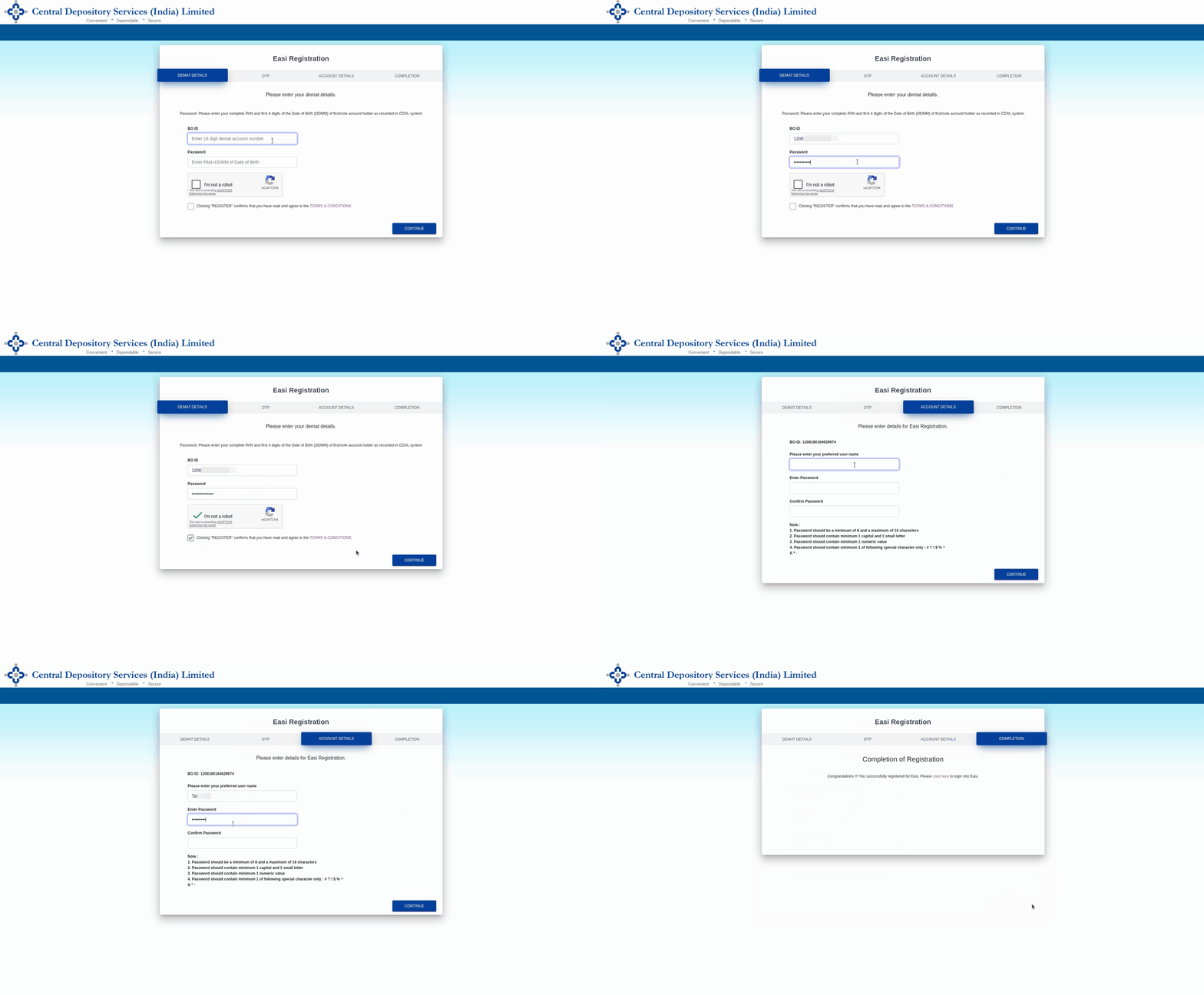
Follow these steps to register for CDSL Easi:
- Visit web.cdslindia.com/myeasitoken/Home/EasiRegistration.
- Under BO ID, enter the 16 digit demat ID.
-
Under
Password,
enter PAN along with the date and month of birth and click on
Continue.
For example, if the PAN number is ALWPG5809L and the DOB is 25-03-1993, enter ALWPG5809L2503.
-
Enter the OTP sent to the registered email ID or mobile number and click on
Continue.
-
Enter a username, password and click on
Continue.
-
If you hold multiple demat accounts, you can enter the demat IDs of your other accounts to group them together. Grouping allows you to access multiple demat accounts using a single user ID. Click on
Continue
to complete your registration successfully.
Once registered, you can also download your statement of holdings (SOH) and statement of transactions (SOT) using CDSL Easi.
For NRI accounts, the mobile number registered with CDSL is not displayed under the Profile section in the CDSL Easi/Easiest portal due to a system limitation specific to NRI accounts. However, the registered mobile number can be verified in the CMR copy, which can be downloaded from Console.